

Auto Optimizer (Beta)
Auto Optimizer (Beta)
Section titled “Auto Optimizer (Beta)”The Auto Optimizer is a fully autonomous AI agentic system that optimizes your document processing configuration — no manual prompt engineering or technical expertise required. It performs the same work a human expert would do manually over days or weeks, but fully autonomously in just a few hours.
Demo Video
Section titled “Demo Video”Non Technical
Section titled “Non Technical”Duration: ~1.5 minutes
Technical
Section titled “Technical”Duration: ~3.5 minutes
What it does
Section titled “What it does”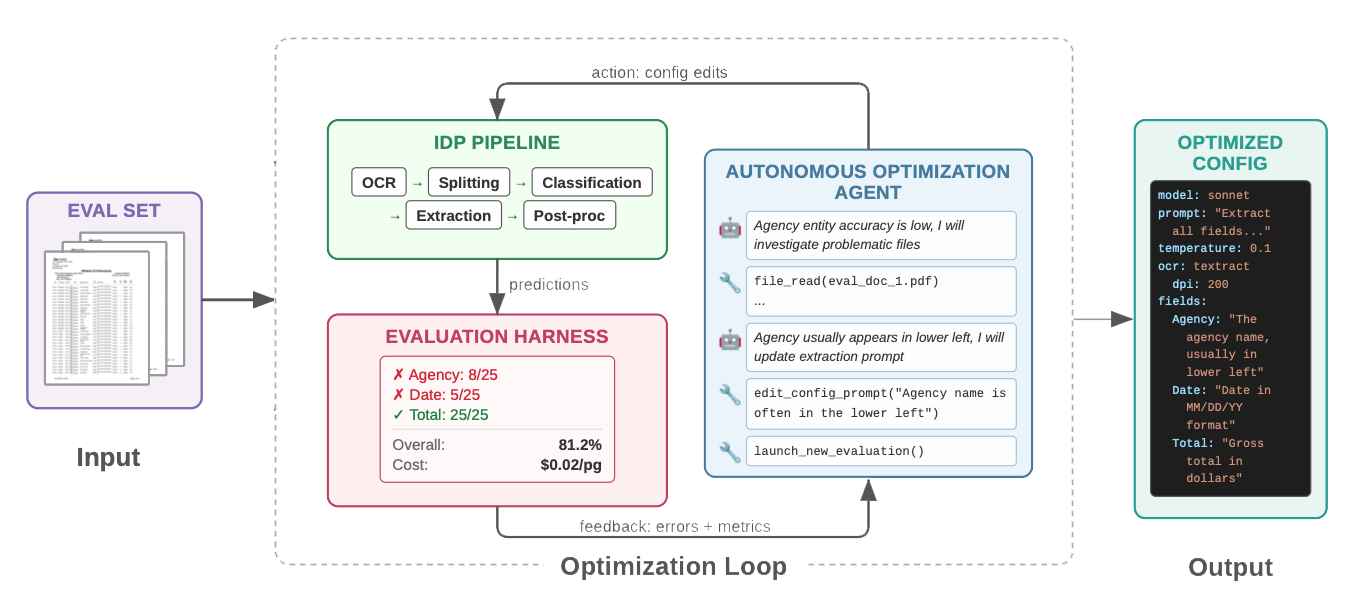
You provide:
- A labeled dataset (as few as 5 documents)
- A cost-per-page budget reflecting your business requirements
The Auto Optimizer handles the rest. It iteratively runs experiments to refine:
- Extraction and classification prompts
- Model selection
- Processing pipeline configurations
- Formatting instructions
The agent is equipped with curated, expert-authored domain knowledge about the IDP system, enabling informed optimization decisions rather than blind trial-and-error.
How it works
Section titled “How it works”- Dataset exploration — The agent examines both ground truth labels and document images using a multimodal model to understand your document types.
- Baseline creation — It determines the document classes present and creates an initial IDP configuration.
- Iterative optimization — The agent inferences the test set, downloads results, identifies poorly performing classes and documents, performs prompt engineering and pipeline reconfigurations, and evaluates again.
- Convergence — After multiple iterations, it recommends the best configuration found within your cost budget.
Throughout the process, the agent produces:
- A live stream of its reasoning and actions, visible in the UI in real time
- A succinct markdown optimization log
- A structured final report showing all experiments tried and which configuration it recommends
Scientific validation
Section titled “Scientific validation”The Auto Optimizer system is scientifically validated in this paper submitted to the 2026 Conference on Empirical Methods in Natural Language Processing (EMNLP). In controlled experiments it surpassed human expert accuracy on multiple real-world document datasets, and those improvements generalize to unseen documents with no overfitting.
Availability
Section titled “Availability”The Auto Optimizer is a paid extension to the IDP Accelerator, available as a subscription on AWS Marketplace. It is in beta: subscribing means accepting the beta licence terms shown on the listing, and it is labelled Auto Optimizer (Beta) in the IDP web UI until it reaches general availability.
It is published for the same Regions as the accelerator’s own templates — us-east-1, us-west-2, and eu-central-1. Your IDP Accelerator stack has to run in one of them; an extension page in any other Region says so instead of offering an install.
Once installed, it appears under Extensions in the IDP web UI navigation.
Starting an optimization run
Section titled “Starting an optimization run”From the Auto Optimizer page in the UI:
- Test set — Select a labeled dataset you’ve uploaded to the IDP accelerator
- Max cost per page — The cost-per-page budget your business can afford (e.g., $0.03/page)
- Max optimization cost — A cap on total spend for this optimization run
- Max iterations — Number of experiment iterations the agent should complete
- Starting config (optional) — An existing configuration to start from, or leave empty to start from scratch
- Guidance (optional) — Free-text instructions to steer the agent
Once started, the agent streams its progress live to the UI. You are free to log out — the agent continues running autonomously.
Getting access
Section titled “Getting access”- Deploy the IDP Accelerator if you haven’t already — the extension installs into a host stack you run, so it has nothing to attach to on its own. See Quick Start.
- Subscribe on AWS Marketplace, where you accept pricing, the beta licence terms, and the AWS Customer Agreement. Subscribe with the same AWS account your IDP Accelerator stack runs in — a subscription held by another account in your organization isn’t visible to a member account’s stack.
- Install it from the IDP web UI. Sign in as an
Admin, open Auto Optimizer (Beta) under Extensions, and choose Launch Stack. Full walkthrough: After Subscribing on AWS Marketplace.
Manage or cancel the subscription any time from the AWS Marketplace subscriptions console. Cancelling does not delete the extension’s CloudFormation stack — delete that separately if you want its resources removed.
For questions about the beta, reach out to your AWS account team.