

GenAIIDP Architecture
Copyright Amazon.com, Inc. or its affiliates. All Rights Reserved. SPDX-License-Identifier: MIT-0
GenAIIDP Architecture
Section titled “GenAIIDP Architecture”Flow Overview
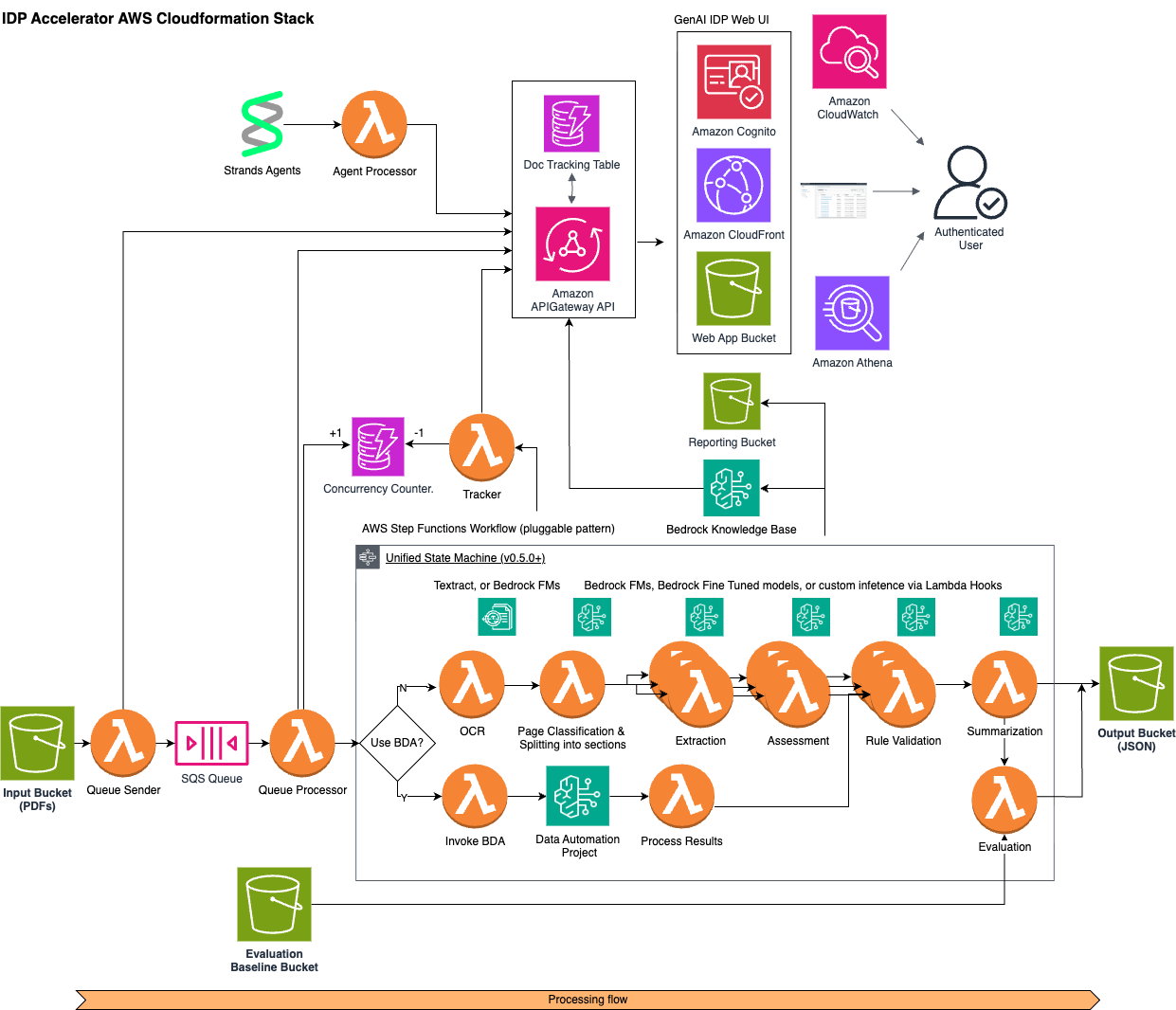
Section titled “Flow Overview”- Documents uploaded to Input S3 bucket trigger EventBridge events
- Queue Sender Lambda records event in tracking table and sends to SQS
- Queue Processor Lambda:
- Picks up messages in batches
- Manages workflow concurrency using DynamoDB counter
- Starts Step Functions executions
- Step Functions workflow runs the steps defined in the selected pattern to process the document and generate output in the Output S3 bucket
- Workflow completion events update tracking and metrics
Components
Section titled “Components”- Storage: S3 buckets for input documents and JSON output
- Message Queue: Standard SQS queue for high throughput
- Functions: Lambda functions for queue operations
- Step Functions: Document processing workflow orchestration
- DynamoDB: Tracking and concurrency management
- CloudWatch: Comprehensive monitoring and logging
- Web UI: Browser-based interface for document management and visualization
- CloudFront distribution for global availability (default), or API Gateway for VPC-based hosting (see API Gateway Hosting)
- Cognito user authentication
- An API Gateway REST API with a dispatcher Lambda for UI-backend interactions
- Evaluation: Document processing accuracy assessment system
- Document Knowledge Base: Optional Bedrock Knowledge Base for document querying
Modular Design Overview
Section titled “Modular Design Overview”The solution uses a modular architecture with nested CloudFormation stacks to support multiple document processing patterns while maintaining a common infrastructure for queueing, tracking, and monitoring. This design enables:
- Support for multiple processing patterns without duplicating core infrastructure
- Easy addition of new processing patterns without modifying existing code
- Centralized monitoring and management across all patterns
- Pattern-specific optimizations and configurations
- Optional features that can be enabled across all patterns:
- Document summarization (controlled by configuration
summarization.enabledproperty)- This feature also enables the “Chat with Document” functionality
- This feature does not use the Bedrock Knowledge Base but stores a full-text text file in S3
- Document Knowledge Base (using Amazon Bedrock)
- Automated accuracy evaluation against baseline data
- Document summarization (controlled by configuration
Stack Structure
Section titled “Stack Structure”Main Stack (template.yaml)
Section titled “Main Stack (template.yaml)”The main template handles all pattern-agnostic resources and infrastructure:
- S3 Buckets (Input, Output, Working, Configuration, Evaluation Baseline)
- SQS Queues and Dead Letter Queues
- DynamoDB Tables (Execution Tracking, Concurrency, Configuration)
- Lambda Functions for:
- Queue Processing
- Queue Sending
- Workflow Tracking
- Document Status Lookup
- Evaluation
- UI Integration and API Resolvers
- CloudWatch Alarms and Dashboard
- SNS Topics for Alerts
- Web UI Infrastructure:
- CloudFront Distribution (default) or API Gateway (API Gateway Hosting)
- S3 Bucket for static web assets
- CodeBuild project for UI deployment
- Authentication:
- Cognito User Pool and Client
- Identity Pool for secure AWS resource access
The UI-facing API itself lives in the nested/api-resolvers/ nested stack, described below.
Nested Stacks
Section titled “Nested Stacks”The main template stays under CloudFormation’s per-template resource limit by delegating whole subsystems to nested stacks. Two of the five are conditional and the other three are created by every deployment:
| Logical id | Source | Created | Contents |
|---|---|---|---|
PATTERNSTACK | patterns/unified/ | Always | The Step Functions state machine and every processing Lambda for both the BDA and pipeline modes, plus the pattern CloudWatch dashboard |
APIRESOLVERSTACK | nested/api-resolvers/ | Always | The API Gateway REST API and dispatcher Lambda the Web UI calls, and the resolver Lambdas behind it |
MULTIDOCDISCOVERYSTACK | nested/multi-doc-discovery/ | Always | The discovery workflow that infers blueprints from sample documents. The resources exist in every deployment and sit idle until someone starts a discovery job |
DOCUMENTKB | nested/bedrockkb/ | Condition: ShouldCreateDocumentKnowledgeBase | The optional Bedrock Knowledge Base and its ingestion resources |
FeaturePlatformStack | feature-platform/main-stack-extensions/ | Condition: IsFeaturePlatformEnabled | The InstalledFeatures table and the registration/hook resolver Lambdas that third-party features call at install time |
APIRESOLVERSTACK was historically named nested/appsync/ with the logical id
APPSYNCSTACK, from when the Web UI talked to AWS AppSync. AppSync has since been
removed and the directory and logical id renamed; see
migration-appsync-to-rest.md.
For detailed information about configuration capabilities, see configuration.md.
Unified Pattern Architecture
Section titled “Unified Pattern Architecture”The solution uses a Unified Pattern that combines both BDA and pipeline processing modes into a single deployment. The use_bda configuration flag (set via the UI) controls which processing path is used at runtime:
- Pipeline mode (
use_bda: false, default) — OCR → Classification → Extraction → Assessment → Rule Validation → Summarization → Evaluation - BDA mode (
use_bda: true) — BDA Invoke → BDA Process Results → Rule Validation → Summarization → Evaluation
Shared Processing Steps
Section titled “Shared Processing Steps”Both modes share a common tail in the workflow:
- HITL Check — Routes documents to human review if confidence is below threshold
- Rule Validation — Applies configurable business rules (when enabled)
- Summarization — Generates document summaries using Bedrock LLM
- Evaluation — Compares results against ground truth baselines (when available)
Deployment
Section titled “Deployment”For detailed information on deploying this solution, see deployment.md.
The unified pattern is deployed as a single nested stack (PATTERNSTACK) containing the Lambda functions for both processing modes — the BDA branch, the pipeline branch, and the shared tail — so both paths are always present and neither needs a redeployment to switch to. There is no pattern selector parameter; the processing mode is controlled entirely by the use_bda configuration flag set via the UI.
Note: The separate Pattern 1 and Pattern 2 deployments have been deprecated in favor of this unified architecture. See pattern-1.md and pattern-2.md for historical reference.
Integrated Monitoring
Section titled “Integrated Monitoring”The solution creates an integrated CloudWatch dashboard that combines metrics from both the main stack and the selected pattern stack:
-
The main stack creates a dashboard with core metrics:
- Queue performance
- Overall workflow statistics
- General error tracking
- Resource utilization
-
Each pattern stack creates its own dashboard with pattern-specific metrics:
- OCR performance
- Classification accuracy
- Extraction stats
- Model-specific metrics
-
The
DashboardMergerLambda function combines these dashboards
For detailed information about monitoring capabilities, see monitoring.md.
Web UI Architecture
Section titled “Web UI Architecture”The solution includes a React-based web user interface for document management and visualization:
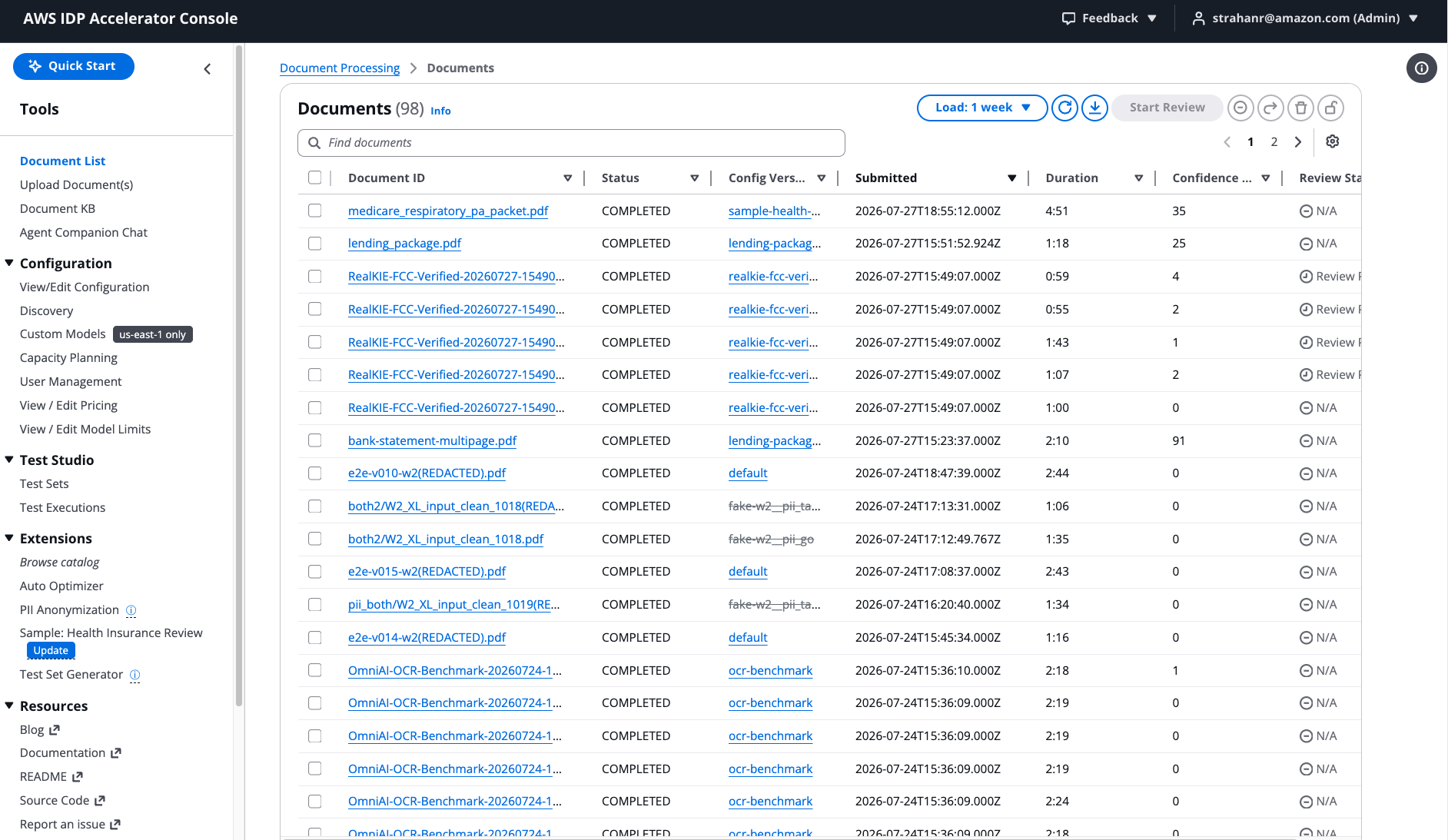
For detailed information about the Web UI, its features, and usage, see web-ui.md.
- Authentication: Amazon Cognito provides secure user authentication and authorization
- Admin users are created during deployment
- Optional self-signup can be enabled with domain restrictions
- Identity pools provide secure, temporary AWS credentials
- Content Delivery: CloudFront distribution serves the static web assets (default), or API Gateway (as an S3 proxy on the existing REST API) for VPC-based hosting (see API Gateway Hosting)
- Global availability and low latency (CloudFront) or private network access (API Gateway with
ApiGatewayVisibility=PRIVATE) - WAF integration for added security (optional)
- Geographical restrictions can be applied
- Global availability and low latency (CloudFront) or private network access (API Gateway with
-
API Layer: An API Gateway REST API connects the UI to backend services
- Every UI operation goes through a single
POST /op/{field}route, integrated with a dispatcher Lambda that validates the request’s argument shape and forwards it to the resolver Lambda registered for that field - A Cognito user-pool authorizer on the method authenticates the caller and
rejects an unauthenticated request with 401 before any Lambda runs;
authorization is then enforced inside each resolver from the caller’s
cognito:groupsclaim, returning 403 for an authenticated user who lacks the required group - Status changes reach the UI by polling (
src/ui/src/hooks/use-polling.ts), which pauses while the browser tab is hidden, rather than by a push subscription - Companion-chat tokens are the one exception to the single route: they stream
from a dedicated Lambda Function URL (
InvokeMode=RESPONSE_STREAM) that the browser reads directly, signing the request with SigV4 using Cognito identity-pool credentials - REST (API Gateway v1) rather than HTTP API (v2), because only REST supports a PRIVATE endpoint type and a WAFv2 web ACL on the stage — both of which this solution needs for private-network and GovCloud deployments
The GraphQL schema at
nested/api-resolvers/src/api/schema.graphqlis retained, but no GraphQL service evaluates it. It is a typed contract: the UI generates its TypeScript types from it, the build generates the dispatcher’s argument validation spec from it, andmake api-test-staticchecks the per-resolver group requirements against it. See migration-appsync-to-rest.md for the full before-and-after and rbac.md for the authorization model. - Every UI operation goes through a single
-
Document Operations: The UI supports:
- Document upload and S3 presigned URL generation
- Status tracking and results visualization
- Configuration management
- Knowledge base querying (when enabled)
Optional Features
Section titled “Optional Features”Document Summarization
Section titled “Document Summarization”When enabled via the configuration summarization.enabled property (default: true), the solution provides document summarization across all patterns:
- All patterns use a dedicated summarization step with Bedrock models
- Summarization provides a concise overview of the document content
- Results can be viewed in the Web UI and downloaded or printed
- Configuration settings control summarization behavior per pattern
Document Knowledge Base
Section titled “Document Knowledge Base”The solution optionally integrates with Amazon Bedrock Knowledge Base:
- Processed documents are indexed in a knowledge base
- Enables natural language querying of document content
- Supports various Bedrock models (Amazon Nova, Anthropic Claude)
- Exposed to the UI as operations on the REST API, so knowledge-base queries use the same authenticated route as every other UI operation
For detailed information about the Knowledge Base integration, see knowledge-base.md.
Accuracy Evaluation
Section titled “Accuracy Evaluation”The solution includes a comprehensive evaluation system:
- Baseline Data: Ground truth data stored in the evaluation baseline bucket
- Automatic Evaluation: When enabled, each processed document is automatically evaluated against baseline data if available
- Metrics:
- Extraction accuracy for key-value pairs
- Classification accuracy across document types
- Summarization quality assessment
- UI Integration: Results visualized in the web interface
- CloudWatch Metrics: Aggregated accuracy metrics for monitoring
For detailed information about the evaluation system, see evaluation.md.
Bedrock Guardrails Integration
Section titled “Bedrock Guardrails Integration”The solution supports optional Amazon Bedrock Guardrails integration:
- Define content boundaries for Bedrock model outputs
- Apply guardrails to all Bedrock model interactions across all patterns
- Support for all Guardrail policy types, including content filters, topic restrictions, PII detection, and Automated Reasoning Checks for formal verification of model outputs
- Support for both DRAFT and versioned guardrails
- Configuration parameters:
BedrockGuardrailId- ID of an existing Bedrock GuardrailBedrockGuardrailVersion- Version of the guardrail to use (e.g., DRAFT, 1, 2)
- Guardrails can be applied to:
- Extraction operations
- Summarization (when enabled)
- Knowledge Base interactions (when enabled)
Post-Processing Lambda Hook
Section titled “Post-Processing Lambda Hook”The solution supports an optional post-processing Lambda hook integration:
- Automatically triggered via EventBridge after a document is successfully processed
- Configured via the
PostProcessingLambdaHookFunctionArnparameter - Enables custom downstream processing of document extraction results
- Can be used for integration with other systems such as:
- Enterprise document management systems
- Business process workflows
- Data analytics pipelines
- Custom notification systems
- Receives the document processing details and output location
For comprehensive implementation guidance, use cases, and code examples, see post-processing-lambda-hook.md.
Note that this stack parameter is a different mechanism from the postprocessing
pipeline hook described in the next section, despite the similar name. This one
fires asynchronously via EventBridge after the Step Functions execution has
finished and receives a snapshot of the document it cannot change; the pipeline hook
runs inside the workflow and can return a modified document.
Extension Points
Section titled “Extension Points”Three mechanisms let you add behaviour to a deployment without forking the templates or the pipeline code. They operate at different layers and solve different problems, so the first question is which layer your change belongs at.
Pipeline hooks — change what happens to a document
Section titled “Pipeline hooks — change what happens to a document”A pipeline hook is your own Lambda, invoked synchronously at a named point in the Step Functions workflow, that can read and optionally rewrite the document as it passes through. Seven hook points exist:
| Hook point | Fires |
|---|---|
preprocessing | Before any processing, on the raw input |
postOcr | After OCR, before classification |
postClassification | After classification, before extraction |
postExtraction | After extraction |
postRuleValidation | After rule validation |
postSummarization | After summarization |
postprocessing | After evaluation, as the workflow’s last step |
Four of the seven fire in both BDA and pipeline modes, for two different reasons.
preprocessing is the state machine’s StartAt state, so it runs before the
use_bda routing choice is made and even when OCR is disabled. The two branches
rejoin at the HITL check, so postRuleValidation, postSummarization and
postprocessing all sit on the shared tail. Only postOcr,
postClassification and postExtraction are on the pipeline branch alone; a
BDA-mode document never reaches them. All seven are dispatched by a
single PipelineHooksDispatcherFunction in the pattern stack, which invokes your
Lambda, applies its response, and enforces the guardrails; you never wire a state
machine transition yourself. A hook returns its changes under the
updatedDocument key (idp_common.hooks.UPDATED_DOCUMENT_KEY), and a
preprocessing hook may additionally return halt=True to stop the document
before any work is spent on it. Every hook point is inert unless enabled in the
active configuration version, which means a hook can be turned on, retargeted, or
switched off by activating a different configuration — no redeployment.
Reach for a pipeline hook when the document itself needs to change: redacting PII
before extraction, calling a third-party enrichment service, or gating documents
that fail a business precondition. The helpers live in
lib/idp_common_pkg/idp_common/hooks/ and the dispatcher in
patterns/unified/src/pipeline_hooks_function/. See
feature-platform.md.
Feature Platform — add a whole feature, including UI
Section titled “Feature Platform — add a whole feature, including UI”A Feature Platform feature is a separate CloudFormation stack that a customer
deploys alongside an existing IDP stack and that registers itself with the host at
install time. Its ui-deployer/ custom resource copies the feature’s UMD bundle
into the host’s Web UI bucket so the feature’s screens appear in the running UI,
then calls the host’s registration Lambdas — RegisterFeature,
RegisterFeatureHooks and ApplyFeatureConfigPreset — by direct
lambda:InvokeFunction on ARNs the host exports as
<MainStackName>-RegisterFeatureFunctionArn and siblings. Registration records the
feature in the host’s InstalledFeatures DynamoDB table, optionally binds the
feature’s own Lambda to one of the pipeline hook points above, and optionally seeds
configuration defaults. Uninstalling reverses each step.
Reach for the Feature Platform when the addition is a product rather than a step: it has its own screens, its own resources, its own lifecycle, and is installed and removed independently of the host stack. Nothing in the host template needs to change to accept one. See feature-platform-developer-guide.md.
idp_common extras — compose the library a Lambda actually needs
Section titled “idp_common extras — compose the library a Lambda actually needs”lib/idp_common_pkg is published as a single distribution with optional
dependency groups, so each Lambda installs only the subpackages it uses and stays
within Lambda’s package-size limits. A Lambda’s requirements.txt names the
extras it needs, for example ../../lib/idp_common_pkg[extraction,docs_service].
The available extras are core, ocr, classification, extraction,
assessment, evaluation, rule_validation, reporting, agents, synthesis,
docs_service, multi_document_discovery, code_intel, image, and all.
This is the extension point for adding a capability to the library: a new service module goes in its own subpackage with its own extra, and only the functions that opt in pay for its dependencies. Always install from the local checkout rather than by bare name — the package names belong to unrelated parties on public PyPI. See dependency-confusion.md.
An
appsyncextra is still declared for backward compatibility with out-of-tree code that referenced it. It is vestigial: the module it existed for was removed with AppSync and norequirements.txtin this repository installs it.
Two narrower substitution points
Section titled “Two narrower substitution points”Beyond the three above, two smaller seams are worth knowing about because they avoid writing a hook for what is really a swap:
model_id: "LambdaHook"replaces a Bedrock model call with your own Lambda for an individual pipeline step, receiving a Converse-shaped payload. Use it to plug in a non-Bedrock OCR or inference provider. See lambda-hook-inference.md.PostProcessingLambdaHookFunctionArn, described in the previous section, delivers a completed document to a downstream system asynchronously.
Additional Documentation
Section titled “Additional Documentation”- classification.md - Details on document classification capabilities
- extraction-and-confidence.md - Details on data extraction, confidence, and geometry capabilities
- troubleshooting.md - Troubleshooting guidance and common issues