Repo tour
Every top-level directory carries its own README — this page tells you which door to open. Descriptions below are the packages' own words, condensed.
The deployable platform
gco/— CDK infrastructure stacks, the Kubernetes services that run inside the EKS clusters, data models, and configuration.gco/stacks/defines the cloud infrastructure;gco/services/holds the in-cluster microservices (health monitor, manifest processor, queue processor, inference monitor, inference proxy).lambda/— AWS Lambda functions powering the infrastructure layer: cluster operations, API routing, security, and cross-region coordination. Deployed by the CDK stacks.dockerfiles/— the six Kubernetes service images (two-stage distroless builds).app.pyandcdk.json— the CDK app entry point and the deployment configuration (regions, features, thresholds).
The interfaces
cli/— thegcocommand-line interface for managing infrastructure, jobs, inference endpoints, and operations. Reference: docs/CLI.md.gco_mcp/— an MCP server exposing the CLI and the whole project (docs, examples, source, manifests) as tools for LLM interaction. Some tool groups are gated behind opt-in feature flags.
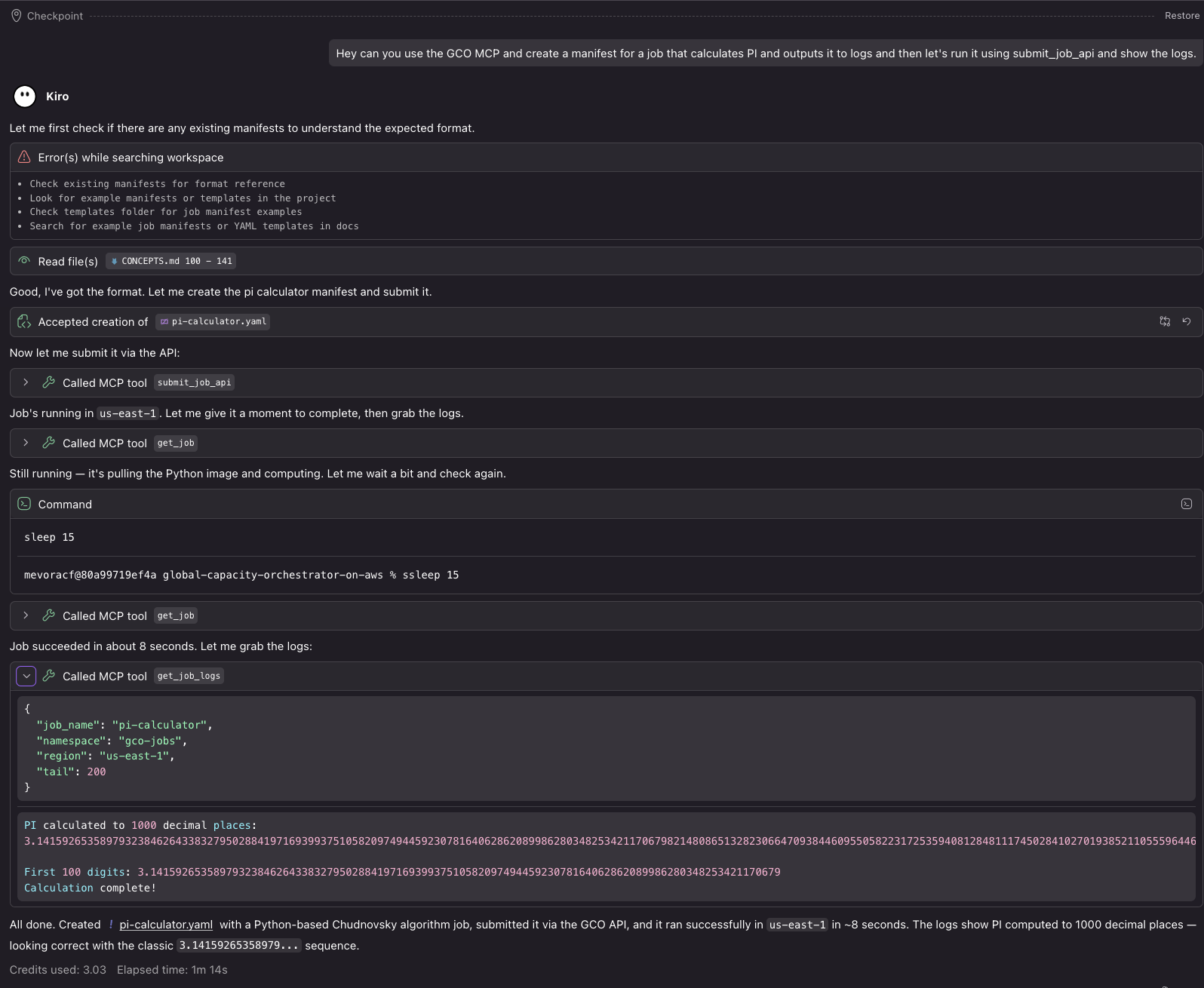
The MCP server end to end: writing a manifest, running it on available capacity, and pulling the logs — without leaving the editor.
The material you'll use daily
examples/— self-contained, ready-to-submit Kubernetes manifests for every workload category: GPU jobs, TrainJobs, gang scheduling, Ray, Slurm, KEDA, storage, inference servers, DAG pipelines, and more.docs/— the guide corpus: concepts, architecture, CLI and API references, customization, per-scheduler guides, runbooks, and maintenance. Its README is the index with suggested reading orders.images/— screenshots and visual assets (this wiki serves them too).
The engineering scaffolding
tests/— the pytest + BATS suite, organized by component; every test module is registered and described in its README.scripts/— utility scripts for development, testing, and operations (CI-only scripts live under.github/scripts/)..github/— workflows, composite actions, scanner configs, and templates, all documented in.github/CI.md(see How we build & test).wiki/— the source of this site. Its README describes every page and the whole pipeline behind it: the staging step that assembles the pages, the images and the API spec sheets into one source tree, the strict Zensical build, the gate on every PR, and the GitHub Pages deploy that merges in the coverage reports after eachmainrun.diagrams/— auto-generated architecture diagrams, code flowcharts, and the API spec sheets, regenerated from the CDK app, the source, the HTTPRoute manifest and the FastAPI applications so they track reality. The spec sheets — the two API Gateways, the in-cluster Gateway and the four services — are this wiki's API reference, whose index embeds a diagram of how those surfaces fit together; the interactive Swagger UI consoles live at /swagger/.
Suggested first hour
- Skim the README top-to-bottom — it is the project's front page for a reason.
- Read docs/CONCEPTS.md for the mental model, then browse examples/ to see the workload surface.
- Open the package README closest to what you want to change — each one orients you locally before you read code.