

Monitoring and Logging
Copyright Amazon.com, Inc. or its affiliates. All Rights Reserved. SPDX-License-Identifier: MIT-0
Monitoring and Logging
Section titled “Monitoring and Logging”The GenAIIDP solution provides comprehensive monitoring through Amazon CloudWatch to give you visibility into the document processing pipeline.
CloudWatch Dashboard
Section titled “CloudWatch Dashboard”The solution automatically creates an integrated dashboard that displays:
Latency Metrics
Section titled “Latency Metrics”- End-to-End Processing Time: Total time from document upload to completion
- Step Function Execution Duration: Time spent in workflow orchestration
- Lambda Function Latency: Processing time per function (OCR, Classification, Extraction)
- Queue Wait Time: Time documents spend in processing queues
- Model Inference Time: Bedrock model response latencies
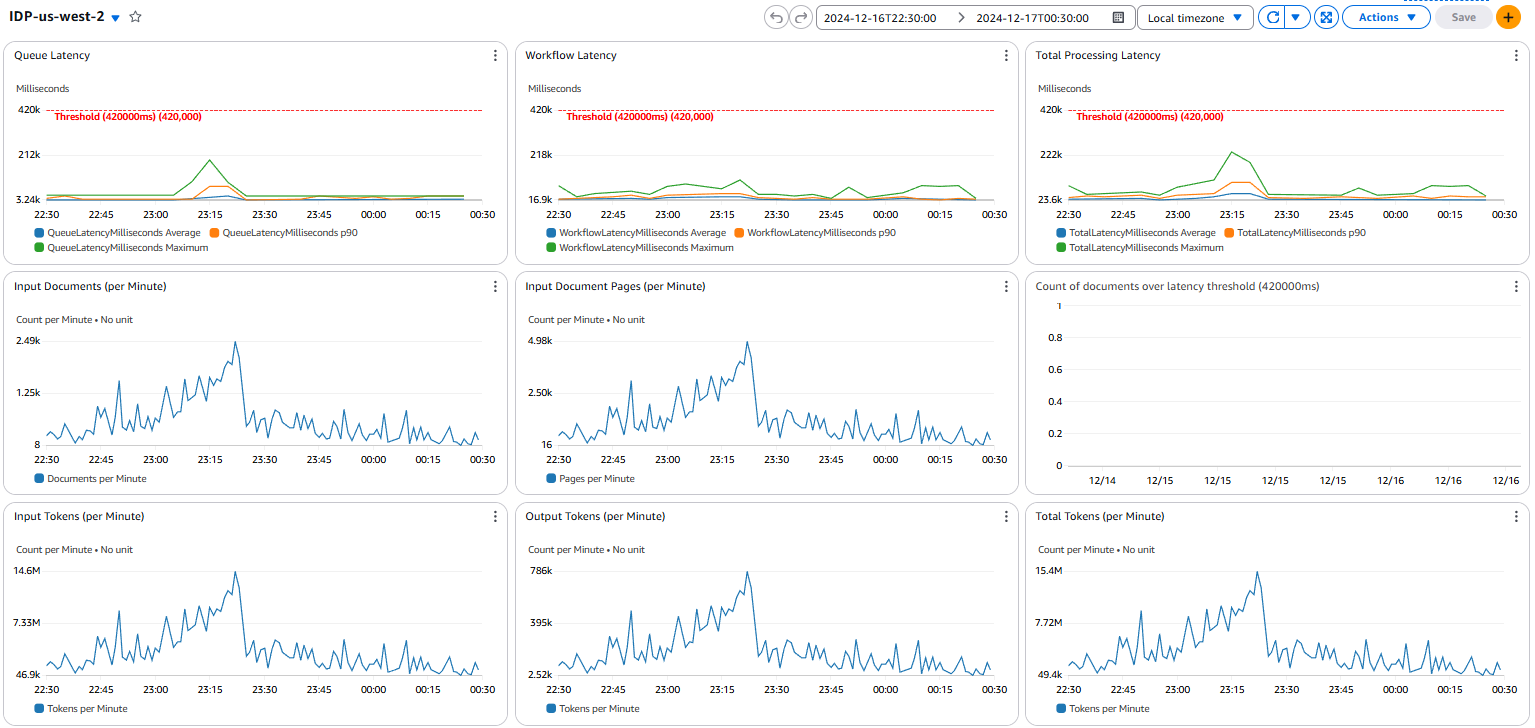
Throughput Metrics
Section titled “Throughput Metrics”- Documents Processed per Hour: Overall system throughput
- Pages Processed per Minute: OCR processing rate
- Classification Requests per Second: Page classification throughput
- Extraction Completions per Hour: Field extraction processing rate
- Queue Message Rate: SQS message processing velocity
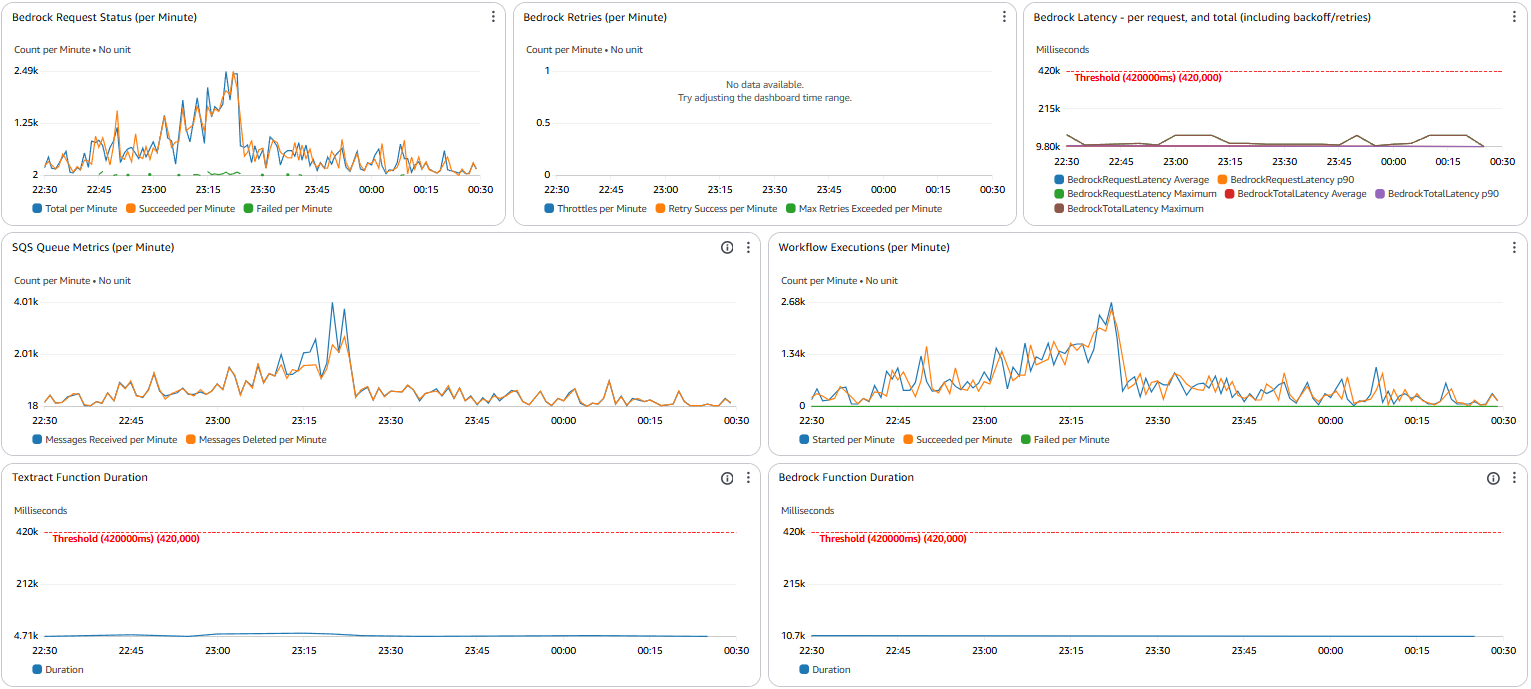
Error Tracking
Section titled “Error Tracking”- Workflow Failures: Step Function execution failures with error categorization
- Lambda Timeouts: Function timeout events and duration analysis
- Model Throttling: Bedrock throttling events and retry patterns
- Dead Letter Queue Messages: Failed messages requiring manual intervention
- Validation Errors: Data validation failures and format issues
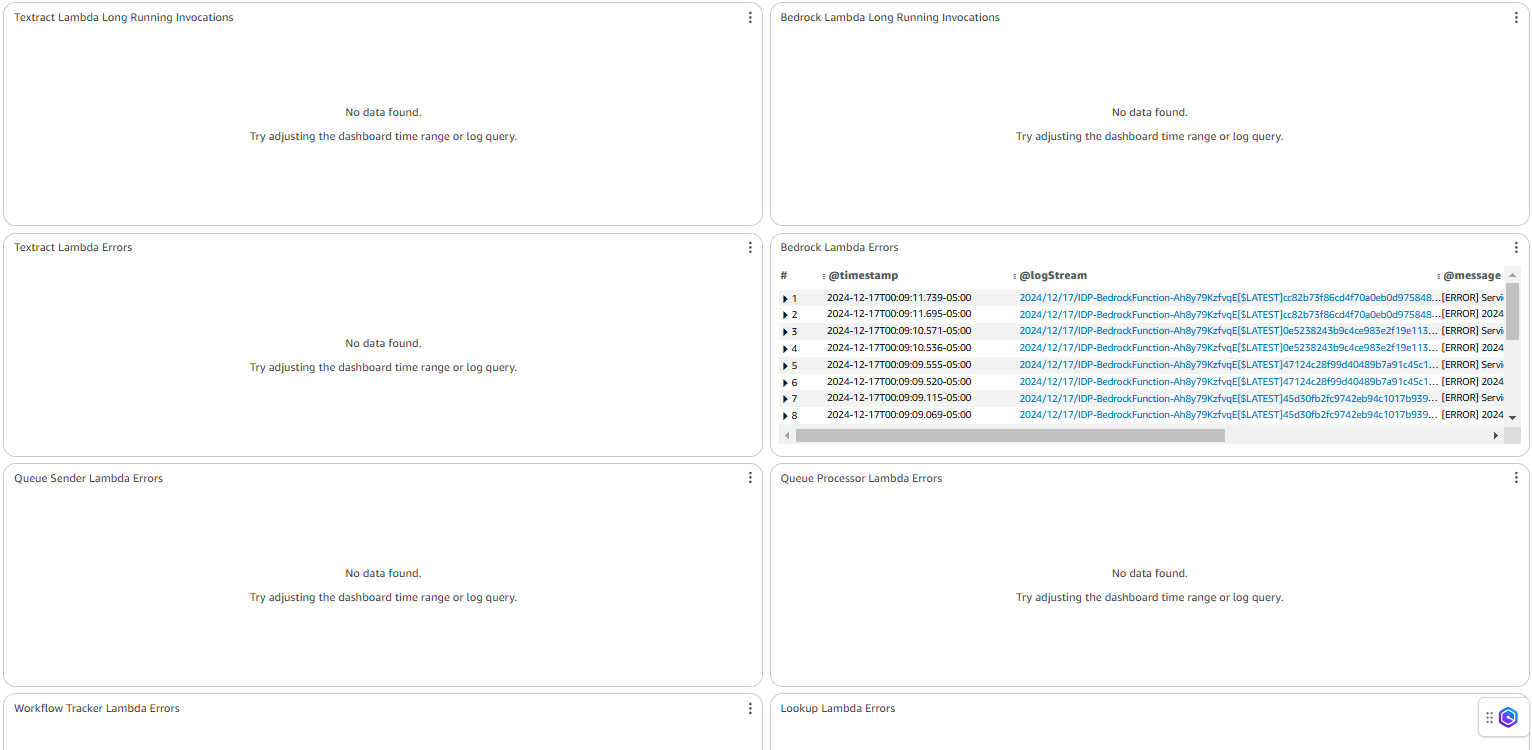
Log Groups
Section titled “Log Groups”The solution creates centralized logging across all components:
/aws/stepfunctions/IDPWorkflow: Step Function execution logs/aws/lambda/QueueProcessor: Document queue processing logs/aws/lambda/OCRFunction: OCR processing logs and errors/aws/lambda/ClassificationFunction: Classification processing logs/aws/lambda/ExtractionFunction: Extraction processing logs/aws/lambda/TrackingFunction: Document tracking and status logs/aws/appsync/GraphQLAPI: Web UI API access logs
All logs include correlation IDs for tracing individual document processing journeys.
Pattern-Specific Monitoring
Section titled “Pattern-Specific Monitoring”Each pattern includes additional monitoring tailored to its specific workflow:
Pattern 1: Bedrock Data Automation (BDA)
Section titled “Pattern 1: Bedrock Data Automation (BDA)”- BDA project execution metrics
- API usage and throttling
- Media processor performance
Pattern 2: Textract + Bedrock
Section titled “Pattern 2: Textract + Bedrock”- Textract OCR performance
- Bedrock model usage
- Classification confidence distribution
- Extraction completeness metrics
Pattern 3: Textract + UDOP + Bedrock
Section titled “Pattern 3: Textract + UDOP + Bedrock”- SageMaker endpoint performance
- UDOP model latency and throughput
- GPU utilization metrics
Setting Up Alerts
Section titled “Setting Up Alerts”You can configure CloudWatch alarms for critical metrics:
- Error Rate Thresholds: Alert when error rates exceed acceptable levels
- Processing Time Anomalies: Detect unusual latency spikes
- Queue Depth Monitoring: Alert on potential backlogs
- Concurrency Limits: Notify when approaching service limits
- Cost Controls: Alert on unusual model usage patterns
Example alarm configuration:
ErrorRateAlarm: Type: AWS::CloudWatch::Alarm Properties: AlarmDescription: Alert when error rate exceeds 5% MetricName: DocumentProcessingErrors Namespace: AWS/Lambda Statistic: Sum Period: 300 EvaluationPeriods: 1 Threshold: 5 ComparisonOperator: GreaterThanThreshold TreatMissingData: notBreaching AlarmActions: - !Ref AlertSNSTopicLog Insights Queries
Section titled “Log Insights Queries”The solution includes predefined CloudWatch Log Insights queries for common analysis tasks:
Error Analysis
Section titled “Error Analysis”filter @message like /ERROR/ or @message like /Exception/| parse @message "Error: *" as errorMessage| stats count(*) as errorCount by errorMessage| sort by errorCount desc| limit 10Processing Time Analysis
Section titled “Processing Time Analysis”filter @message like /Processing complete/| parse @message "Processing complete in * ms" as processingTime| stats avg(processingTime) as avgTime, min(processingTime) as minTime, max(processingTime) as maxTime by bin(30m)| sort by avgTime descDocument Volume Tracking
Section titled “Document Volume Tracking”filter @message like /Document received/| stats count(*) as documentCount by bin(1h)| sort by bin(1h) ascMetric Dimensions
Section titled “Metric Dimensions”Key metrics are available with these dimensions:
- DocumentType: Break down metrics by document class
- ProcessingPattern: Compare metrics across different patterns
- PageCount: Analyze performance based on document complexity
- Region: Track regional performance differences
Performance Benchmarks
Section titled “Performance Benchmarks”The dashboard includes performance benchmark comparisons:
- Current vs. Historical Performance: Compare current metrics against previous periods
- Pattern Comparison: Side-by-side comparison of different processing patterns
- Model Performance: Comparison of different Bedrock models for similar tasks
Operational Monitoring
Section titled “Operational Monitoring”The solution provides operational metrics for infrastructure health:
- Lambda Concurrency: Track function concurrency usage
- Throttling Events: Monitor service limits and throttling
- DynamoDB Capacity: Track consumed read/write capacity units
- S3 Request Rates: Monitor bucket operation rates and latency
- Step Functions Execution Metrics: Track state transitions and execution counts
Cost Monitoring
Section titled “Cost Monitoring”Monitor resource usage and costs:
- Bedrock Model Tokens: Track token usage by model and operation
- Lambda Execution Time: Monitor function duration and memory usage
- S3 Storage: Track storage growth over time
- Data Transfer: Monitor network costs between services
Custom Dashboard Creation
Section titled “Custom Dashboard Creation”You can create custom dashboards focused on specific aspects:
- Open the CloudWatch console
- Go to Dashboards and select “Create dashboard”
- Add widgets using metrics from the “GenAIIDP” namespace
- Organize widgets logically by processing stage or metric type
Exporting Metrics
Section titled “Exporting Metrics”To export metrics for external analysis:
-
Use CloudWatch Metric Streams to send metrics to:
- Amazon Kinesis Data Firehose
- Third-party monitoring tools
- Custom analytics solutions
-
Configure the stream with:
- Metrics namespace filters
- Output format (JSON or OpenTelemetry)
- Destination configuration