

Custom MCP Agent Integration
Copyright Amazon.com, Inc. or its affiliates. All Rights Reserved. SPDX-License-Identifier: MIT-0
Custom MCP Agent Integration
Section titled “Custom MCP Agent Integration”The GenAI IDP solution includes support for External MCP (Model Context Protocol) Agents that can connect to your own MCP servers to provide additional tools and capabilities. This enables you to extend the IDP system with custom functionality hosted in your own infrastructure.
Overview
Section titled “Overview”The External MCP Agent allows you to:
- Extend IDP Capabilities: Add custom tools and services to the document processing workflow
- Cross-Account Integration: Host MCP servers in separate AWS accounts or external infrastructure
- Dynamic Tool Discovery: Automatically discover and integrate available tools from your MCP server
- Secure Authentication: Use AWS Cognito OAuth for secure cross-account access
- Real-time Integration: Tools are available immediately through the IDP web interface
Architecture
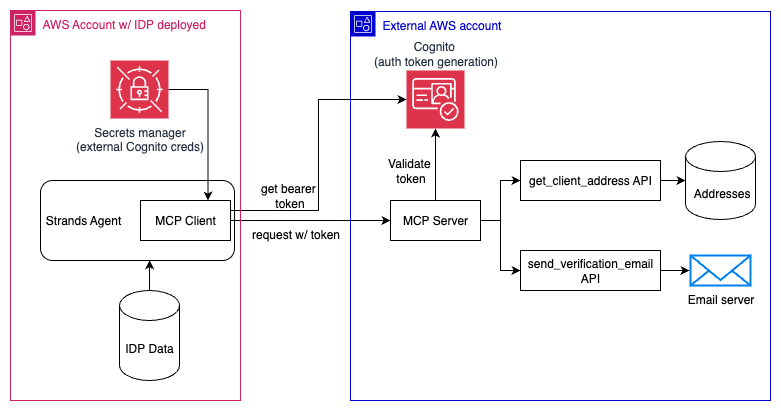
Section titled “Architecture”An example architecture demonstrating the authentication flow and connections between the MCP Client (running in the IDP application) and an external MCP Server (deployed outside of the IDP application) can be seen below. The get_client_address and send_verification_email APIs drawn are just for demonstration purposes.
Prerequisites
Section titled “Prerequisites”Before setting up the External MCP Agent, you need:
- MCP Server: A working MCP server that implements the Model Context Protocol
- AWS Cognito: A Cognito User Pool for authentication (can be in a separate AWS account)
- Network Access: Your MCP server must be accessible via HTTPS from the IDP solution
- AWS Permissions: Access to create secrets in the IDP solution’s AWS account
For guidance on deploying your own MCP servers with Cognito authentication, see the AWS Bedrock Agent Core MCP Documentation.
Setup Instructions
Section titled “Setup Instructions”Step 1: Prepare Your MCP Server
Section titled “Step 1: Prepare Your MCP Server”Your MCP server must:
- Implement MCP Protocol: Follow the Model Context Protocol specification
- Use Streamable HTTP Transport: The IDP solution uses streamable HTTP for MCP connections
- Support OAuth Authentication: Accept OAuth bearer tokens in the
Authorizationheader - Be HTTPS Accessible: Must be reachable via HTTPS from the IDP solution
Example MCP Server Requirements:
# Your MCP server should accept requests like:# POST https://your-server.com/mcp# Authorization: Bearer <cognito-access-token># Content-Type: application/jsonStep 2: Set Up AWS Cognito Authentication
Section titled “Step 2: Set Up AWS Cognito Authentication”Create a Cognito User Pool for MCP authentication (this can be in your own AWS account):
-
Create User Pool:
Terminal window aws cognito-idp create-user-pool \--pool-name "MCP-Server-Auth" \--policies "PasswordPolicy={MinimumLength=8,RequireUppercase=false,RequireLowercase=false,RequireNumbers=false,RequireSymbols=false}" -
Create App Client:
Terminal window aws cognito-idp create-user-pool-client \--user-pool-id <your-pool-id> \--client-name "IDP-MCP-Client" \--auth-flows "USER_PASSWORD_AUTH" -
Create User:
Terminal window aws cognito-idp admin-create-user \--user-pool-id <your-pool-id> \--username "mcp-service-user" \--temporary-password "TempPass123!" \--message-action SUPPRESS# Set permanent passwordaws cognito-idp admin-set-user-password \--user-pool-id <your-pool-id> \--username "mcp-service-user" \--password "SecurePassword123!" \--permanent
Step 3: Configure Your MCP Server for OAuth
Section titled “Step 3: Configure Your MCP Server for OAuth”Your MCP server should validate Cognito tokens:
import boto3import jwtfrom jwt import PyJWKSClient
def validate_cognito_token(token, user_pool_id, region):    """Validate Cognito access token"""    jwks_url = f"https://cognito-idp.{region}.amazonaws.com/{user_pool_id}/.well-known/jwks.json"    jwks_client = PyJWKSClient(jwks_url)
    try:        signing_key = jwks_client.get_signing_key_from_jwt(token)        decoded_token = jwt.decode(            token,            signing_key.key,            algorithms=["RS256"],            audience=None,  # Cognito access tokens don't have audience            options={"verify_aud": False}        )        return decoded_token    except jwt.InvalidTokenError:        return None
# In your MCP server request handler:def handle_mcp_request(request):    auth_header = request.headers.get('Authorization', '')    if not auth_header.startswith('Bearer '):        return {"error": "Missing or invalid authorization header"}
    token = auth_header[7:]  # Remove 'Bearer ' prefix    user_info = validate_cognito_token(token, USER_POOL_ID, REGION)
    if not user_info:        return {"error": "Invalid token"}
    # Process MCP request...
Step 4: Create AWS Secret in IDP Account
Section titled “Step 4: Create AWS Secret in IDP Account”In the AWS account where the IDP solution is deployed, create a secret with your MCP server credentials:
-
Navigate to AWS Secrets Manager in the AWS Console
-
Find the External MCP Agents Secret:
- Use the
ExternalMCPAgentsSecretConsoleURLlink from your CloudFormation stack outputs to go directly to the secret - Alternatively, look for a secret named
{StackName}/external-mcp-agents/credentials(where StackName is your IDP stack name) - This secret is automatically created by the CloudFormation template with an empty array
[]
- Use the
-
Update Secret with JSON Array Structure:
[{"mcp_url": "https://your-first-mcp-server.example.com/mcp","cognito_user_pool_id": "us-east-1_XXXXXXXXX","cognito_client_id": "xxxxxxxxxxxxxxxxxxxxxxxxxx","cognito_username": "mcp-service-user-1","cognito_password": "SecurePassword123!", //<!-- pragma: allowlist secret - Example password for documentation only -->"agent_name": "My Custom Calculator Agent","agent_description": "Provides advanced mathematical calculations for document analysis"},{"mcp_url": "https://your-second-mcp-server.example.com/mcp","cognito_user_pool_id": "us-east-1_YYYYYYYYY","cognito_client_id": "yyyyyyyyyyyyyyyyyyyyyyyyyy","cognito_username": "mcp-service-user-2","cognito_password": "AnotherSecurePassword456!" //<!-- pragma: allowlist secret - Example password for documentation only -->}]
Field Descriptions:
mcp_url: The HTTPS endpoint of your MCP servercognito_user_pool_id: The Cognito User Pool ID from Step 2cognito_client_id: The App Client ID from Step 2cognito_username: The username created in Step 2cognito_password: The permanent password set in Step 2agent_name(optional): Custom name for the agent (defaults to “External MCP Agent {N}”)agent_description(optional): Custom description for the agent (tool information is automatically appended)
Step 5: Verify Integration
Section titled “Step 5: Verify Integration”Once the secret is created, the External MCP Agent will automatically:
- Detect Configuration: The agent factory checks for the secret on startup
- Authenticate: Uses Cognito credentials to obtain bearer tokens
- Connect to MCP Server: Establishes connection using streamable HTTP transport
- Discover Tools: Automatically discovers available tools from your server
- Register Agent: Makes the agent available in the IDP web interface
Check Agent Registration:
from idp_common.agents.factory import agent_factory
# List available agentsagents = agent_factory.list_available_agents()for agent in agents:    print(f"- {agent['agent_id']}: {agent['agent_name']}")    if agent['agent_id'] == 'external-mcp-agent-0':        print(f"  Description: {agent['agent_description']}")
Authentication Flow
Section titled “Authentication Flow”The authentication process works as follows:
- Agent Creation: When a user selects the External MCP Agent in the web UI
- Secret Retrieval: Agent retrieves credentials from AWS Secrets Manager
- Cognito Authentication: Agent calls Cognito
InitiateAuthwithUSER_PASSWORD_AUTH - Token Extraction: Agent extracts the access token from Cognito response
- MCP Connection: Agent connects to MCP server with
Authorization: Bearer <token>header - Tool Discovery: Agent discovers available tools via MCP
list_toolsmethod - Query Processing: User queries are processed using discovered MCP tools
Security Considerations
Section titled “Security Considerations”Cross-Account Security
Section titled “Cross-Account Security”- Least Privilege: Cognito user should only have permissions needed for MCP operations
- Token Rotation: Consider implementing token refresh for long-running operations
- Network Security: Use VPC endpoints or security groups to restrict MCP server access
- Audit Logging: Enable CloudTrail logging for Secrets Manager and Cognito operations
MCP Server Security
Section titled “MCP Server Security”- HTTPS Only: Always use HTTPS for MCP server endpoints
- Token Validation: Properly validate Cognito tokens on every request
- Rate Limiting: Implement rate limiting to prevent abuse
- Input Validation: Validate all tool inputs to prevent injection attacks
Secret Management
Section titled “Secret Management”- Rotation: Regularly rotate Cognito passwords and update the secret
- Access Control: Restrict secret access to only the IDP Lambda execution role
- Encryption: Secrets Manager automatically encrypts secrets at rest
- Monitoring: Monitor secret access through CloudTrail logs
Troubleshooting
Section titled “Troubleshooting”Common Issues
Section titled “Common Issues”Agent Not Appearing in UI:
- Verify secret exists at path:
{StackName}/external-mcp-agents/credentials(check CloudFormation outputs for exact name) - Check secret contains a valid JSON array format (not a single object)
- Review CloudWatch logs for agent registration errors
- Lambda Caching: The ListAvailableAgentsFunction and AgentProcessorFunction have caching that may delay new agents appearing for up to 15 minutes. To force refresh:
- Find the functions named
{StackName}-ListAvailableAgentsFunction-*and{StackName}-AgentProcessorFunction-*in AWS Console → Lambda → Functions - Go to Configuration → Environment variables for each function
- Add a temporary variable like
REFRESH=1and save to restart the functions - Remove the temporary variable after agents appear
- Find the functions named
Authentication Failures:
- Verify Cognito User Pool ID and Client ID are correct
- Ensure username/password are valid and user is confirmed
- Check that App Client allows
USER_PASSWORD_AUTHflow
MCP Connection Errors:
- Verify MCP server is accessible via HTTPS
- Check that server accepts streamable HTTP transport
- Ensure server properly validates Cognito tokens
Tool Discovery Issues:
- Verify MCP server implements
list_toolsmethod correctly - Check that tools are properly registered in your MCP server
- Review MCP server logs for connection and discovery errors
Debugging Steps
Section titled “Debugging Steps”-
Check Agent Logs:
Terminal window aws logs filter-log-events \--log-group-name "/aws/lambda/agent-processor" \--filter-pattern "External MCP" -
Test Cognito Authentication:
import boto3client = boto3.client('cognito-idp')response = client.initiate_auth(ClientId='your-client-id',AuthFlow='USER_PASSWORD_AUTH',AuthParameters={'USERNAME': 'mcp-service-user','PASSWORD': 'SecurePassword123!'})print(response['AuthenticationResult']['AccessToken']) -
Test MCP Server Directly:
Terminal window curl -X POST https://your-mcp-server.com/mcp \-H "Authorization: Bearer <token>" \-H "Content-Type: application/json" \-d '{"method": "list_tools", "params": {}}'
Best Practices
Section titled “Best Practices”Development
Section titled “Development”- Start Simple: Begin with basic tools and gradually add complexity
- Test Locally: Test your MCP server locally before deploying
- Use Type Hints: Provide clear type hints for tool parameters
- Document Tools: Include clear descriptions for each tool
Production
Section titled “Production”- Monitor Performance: Track MCP server response times and error rates
- Implement Caching: Cache frequently accessed data to improve performance
- Handle Errors Gracefully: Return meaningful error messages for tool failures
- Scale Appropriately: Ensure your MCP server can handle concurrent requests
Security
Section titled “Security”- Validate Inputs: Always validate and sanitize tool inputs
- Limit Scope: Only expose tools that are necessary for document processing
- Audit Access: Log all tool usage for security auditing
- Regular Updates: Keep dependencies and security patches up to date
Support
Section titled “Support”For additional help with MCP Agent integration:
- IDP Documentation: Review the main IDP documentation for context
- MCP Specification: Refer to the Model Context Protocol specification
- AWS Cognito: See AWS Cognito documentation
- Troubleshooting: Check CloudWatch logs for detailed error information
The External MCP Agent provides a powerful way to extend the IDP solution with your own custom tools and services while maintaining security and proper authentication.