

Code Intelligence Agent
Copyright Amazon.com, Inc. or its affiliates. All Rights Reserved. SPDX-License-Identifier: MIT-0
Code Intelligence Agent
Section titled “Code Intelligence Agent”The GenAIIDP solution includes a Code Intelligence Agent that provides intelligent codebase understanding and analysis capabilities through the Agent Companion Chat. This agent enables developers and users to interactively explore, understand, and analyze complex codebases using natural language queries, making code comprehension and maintenance significantly more efficient.
Overview
Section titled “Overview”The Code Intelligence Agent is one of several specialized sub-agents available within the Agent Companion Chat’s multi-agent orchestration system. When enabled, the orchestrator can route code-related questions to this agent, which provides comprehensive codebase analysis and understanding capabilities through:
- Intelligent Code Analysis: Natural language queries about codebase structure, functionality, and architecture
- File System Management: Efficient handling of large codebases with smart caching and filtering
- Conversation Memory: Persistent chat sessions via the Agent Companion Chat’s DynamoDB-backed conversation history
- Lambda Integration: Serverless deployment with automatic codebase extraction and initialization
- Multi-Format Support: Support for various file types including Python, JavaScript, Jupyter notebooks, and more
- Context-Aware Responses: Deep technical analysis with accurate code references and examples
- Real-time Code Exploration: Interactive exploration of codebase components and relationships
How It Fits Into Agent Companion Chat
Section titled “How It Fits Into Agent Companion Chat”The Code Intelligence Agent operates as an optional sub-agent within the Agent Companion Chat’s orchestrator system:
User → Agent Companion Chat → Orchestrator Agent ├── Analytics Agent ├── Error Analyzer Agent ├── Code Intelligence Agent (Optional - toggle controlled) └── External MCP Agents (Optional)- The Orchestrator Agent automatically routes code-related queries to the Code Intelligence Agent when it is enabled
- Users control whether the agent is active via the “Enable Code Intelligence Agent” checkbox in the chat interface
- When disabled, the orchestrator will not route any queries to this agent
- The agent shares the same conversation memory, streaming infrastructure, and UI as all other companion chat agents
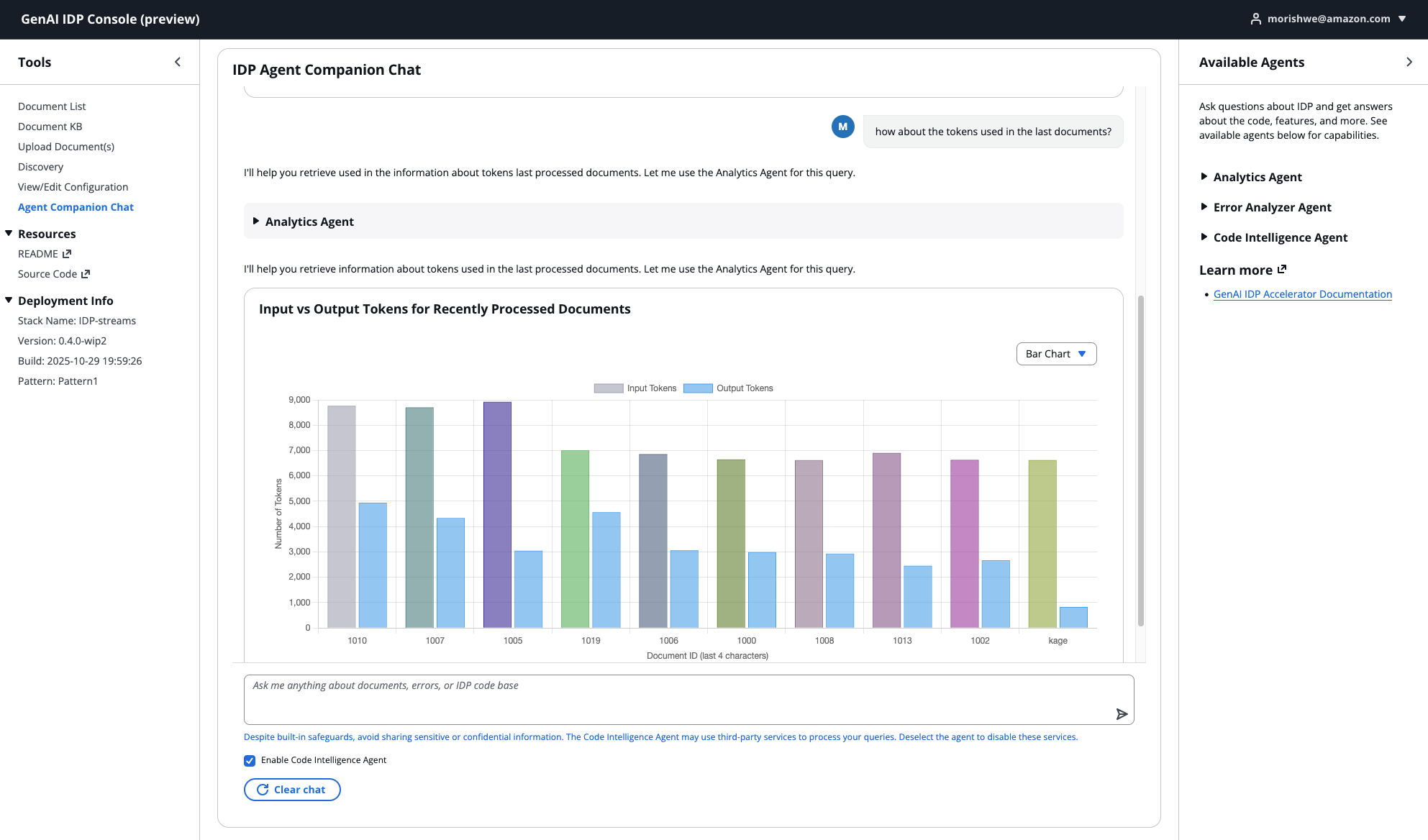
For full details on the Agent Companion Chat architecture, session management, streaming, and multi-agent orchestration, see the Agent Companion Chat documentation.
⚠️ Security and Privacy
Section titled “⚠️ Security and Privacy”IMPORTANT: The Code Intelligence Agent uses third-party MCP (Model Context Protocol) servers (DeepWiki), which means your queries may be sent to external services not controlled by AWS or your organization.
- When Code Intelligence is enabled, queries routed to this agent may be sent to external services
- Data sent to these services is subject to their privacy policies and terms of service
- Keep Code Intelligence disabled by default unless you specifically need code assistance
- Do NOT share sensitive information (credentials, account IDs, proprietary data, customer information) in queries when this agent is enabled
- Use the Analytics Agent or Error Analyzer Agent for queries involving your actual system data — those agents operate entirely within your AWS account
For detailed security guidance and best practices, see the Security and Privacy section in the Agent Companion Chat documentation.
Key Features
Section titled “Key Features”- Natural Language Code Queries: Ask questions about code functionality, architecture, and implementation details
- Intelligent File Discovery: Automatic identification and analysis of relevant code files
- Codebase Overview Generation: Comprehensive understanding of project structure and component relationships
- Multi-File Analysis: Simultaneous analysis of multiple related files for comprehensive understanding
- Notebook Support: Special handling for Jupyter notebooks with image removal and optimization
- Smart Caching: File hashing and overview caching for improved performance
- Advanced Filtering: Configurable ignore patterns to focus on relevant code
- Performance Optimization: Sliding window conversation management and tool result optimization
Architecture
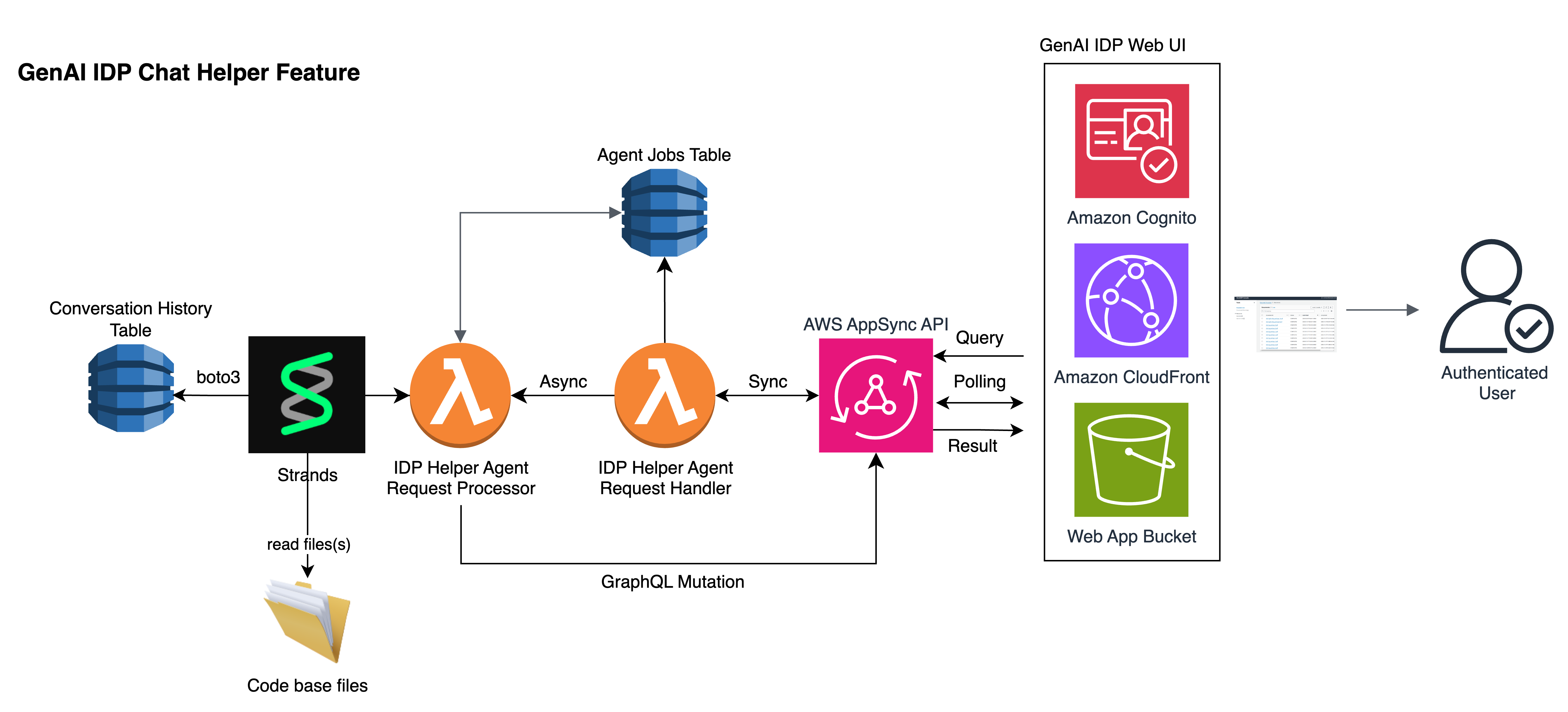
Section titled “Architecture”The Code Intelligence Agent runs within the Agent Companion Chat’s Lambda-based architecture. The shared agent_chat_processor Lambda function hosts the orchestrator and all sub-agents, including Code Intelligence. The system uses Lambda functions for serverless processing with codebase files stored in the Lambda’s /tmp directory.
System Components
Section titled “System Components”- Agent Companion Chat Orchestrator: Routes code-related queries to the Code Intelligence Agent
- Code Intelligence Agent: Processes queries using the Strands framework and specialized tools
- Conversation History Management: Shared DynamoDB-backed memory via
ChatMemoryTable(last 20 turns) - Codebase File System: Uses Lambda /tmp directory for codebase storage
- Web UI Integration: Accessed through the Agent Companion Chat interface with toggle control
Agent Workflow
Section titled “Agent Workflow”- User Sends Message: User submits a question in the Agent Companion Chat interface
- Orchestrator Routing: The orchestrator determines the query is code-related and routes to Code Intelligence Agent
- Codebase Initialization: System extracts and prepares codebase files in the Lambda environment
- Context Loading: Agent loads codebase overview and determines relevant files for analysis
- Intelligent Analysis: Agent processes the query using specialized tools and codebase understanding
- Streaming Response: Results stream back in real-time through the Agent Companion Chat’s AppSync subscription infrastructure
- Conversation Continuity: The response is stored in shared conversation memory for follow-up questions
Code Intelligence Workflow
Section titled “Code Intelligence Workflow”For codebase analysis queries, the Code Intelligence Agent follows this structured workflow:
- Codebase Overview Loading: Agent loads comprehensive codebase structure and file purposes using
load_codebase_overview_context - Relevance Assessment: Determines if specific file contents are needed beyond the overview context
- Intelligent File Retrieval: Retrieves relevant files in ranked order of importance using
read_multiple_files - Multi-File Analysis: Analyzes multiple related files simultaneously for comprehensive understanding
- Context-Aware Response: Provides technical responses with code examples, architectural insights, and implementation details
- Conversation Continuity: Maintains context for follow-up questions within the same chat session
Available Tools
Section titled “Available Tools”The Code Intelligence Agent has access to specialized tools for comprehensive code analysis:
1. Codebase Overview Context Tool
Section titled “1. Codebase Overview Context Tool”- Purpose: Loads existing codebase overview with file purposes and relationships
- Usage: Automatically called to understand project structure and component relationships
- Features:
- High-level overview mode for large codebases (300+ files)
- Detailed analysis mode for comprehensive understanding
- Cached results for improved performance
2. Multi-File Reader Tool
Section titled “2. Multi-File Reader Tool”- Purpose: Efficiently reads multiple related files for comprehensive analysis
- Features:
- Character limit management to respect context windows
- Smart file prioritization and ranking
- Batch processing for improved performance
- Support for various file types and encodings
3. Notebook Reader Tool
Section titled “3. Notebook Reader Tool”- Purpose: Specialized handling of Jupyter notebooks
- Features:
- Automatic image removal for size optimization
- JSON structure preservation
- Size limit enforcement (2GB default)
- Content extraction and formatting
4. File System Management Tools
Section titled “4. File System Management Tools”- Purpose: Comprehensive file system operations and caching
- Features:
- SHA256 hashing for change detection
- Intelligent ignore pattern matching
- Directory tree generation
- File collection with filtering
Using Code Intelligence
Section titled “Using Code Intelligence”Accessing the Feature
Section titled “Accessing the Feature”- Log in to the GenAI IDP Web UI
- Navigate to Agent Companion Chat in the main navigation
- Check the “Enable Code Intelligence Agent” checkbox at the bottom of the chat interface
- Start asking code-related questions — the orchestrator will automatically route them to the Code Intelligence Agent
Note: Code Intelligence is disabled by default for security reasons. Enable it only when you need code assistance and ensure your queries contain no sensitive information. A warning message reminds you: “Avoid sharing sensitive information, the Code Intelligence Agent may use third-party services.”
Types of Questions
Section titled “Types of Questions”The Code Intelligence Agent can answer various types of questions about your codebase:
Architecture and Structure Questions:
- “What is the main architecture of this codebase?”
- “How are the different modules organized?”
- “What are the key components and their relationships?”
- “Explain the overall system design and data flow”
Functionality and Implementation Questions:
- “How does the document processing pipeline work?”
- “What are the different patterns supported by this system?”
- “Explain how the agent framework is implemented”
- “How does the authentication and authorization work?”
Code Analysis Questions:
- “What are the main classes and their purposes?”
- “Show me the key functions in the analytics module”
- “How is error handling implemented across the system?”
- “What design patterns are used in this codebase?”
Configuration and Setup Questions:
- “How do I configure the system for my environment?”
- “What environment variables are required?”
- “How do I set up the development environment?”
- “What are the deployment requirements?”
Sample Queries
Section titled “Sample Queries”Here are some example questions you can ask about the IDP codebase:
"Explain the difference between Pattern 1, Pattern 2, and Pattern 3 in this IDP system"
"How does the agent framework work and what agents are available?"
"What are the main configuration options and how do I customize them?"
"Show me how document processing works from upload to final results"
"How is the web UI integrated with the backend services?"
"What security measures are implemented in this system?"
"How do I add a new document type for processing?"
"Explain the monitoring and logging capabilities"
Understanding Results
Section titled “Understanding Results”The Code Intelligence Agent provides comprehensive responses including:
- Technical Explanations: Detailed explanations of code functionality and architecture
- Code Examples: Relevant code snippets with proper context and annotations
- Architectural Insights: High-level system design and component relationships
- Implementation Details: Specific implementation patterns and best practices
- Configuration Guidance: Setup and configuration instructions with examples
- Troubleshooting Help: Common issues and their solutions
Each response includes:
- Clear technical explanations with appropriate depth
- Direct references to relevant code sections and files
- Step-by-step guidance for complex procedures
- Best practices and recommendations
Responses stream in real-time through the Agent Companion Chat interface, so you can see results as they are generated.
File System Architecture
Section titled “File System Architecture”Current Implementation (Lambda /tmp)
Section titled “Current Implementation (Lambda /tmp)”The Code Intelligence feature currently uses the Lambda function’s /tmp directory for codebase storage:
Advantages:
- Fast Access: Direct file system access with minimal latency
- Simple Implementation: No additional infrastructure required
- Cost Effective: No additional storage costs beyond Lambda execution
Limitations:
- Size Constraints: Limited to 10GB total storage in
/tmp - Ephemeral Storage: Files are lost when Lambda container is recycled
- Cold Start Impact: Codebase extraction required on each cold start
Current Workflow:
- Initialization: Codebase zip files are extracted to
/tmp/codebaseon Lambda startup - Processing: Agent tools read files directly from the
/tmpdirectory - Caching: Overview and hash files are stored in
/tmp/outputfor performance - Cleanup: Temporary files are automatically cleaned up when Lambda container terminates
Future Implementation (EFS Integration)
Section titled “Future Implementation (EFS Integration)”Planned migration to Amazon Elastic File System (EFS) for enhanced scalability:
Planned Advantages:
- Persistent Storage: Codebase files persist across Lambda invocations
- Larger Capacity: Support for much larger codebases (petabyte scale)
- Shared Access: Multiple Lambda instances can access the same codebase
- Faster Cold Starts: No need to extract codebase on each cold start
Configuration
Section titled “Configuration”Model Selection
Section titled “Model Selection”The Code Intelligence Agent uses the model configured for the Agent Companion Chat orchestrator. See the Agent Companion Chat Configuration for supported models and settings.
Infrastructure Components
Section titled “Infrastructure Components”The Code Intelligence Agent shares infrastructure with the Agent Companion Chat:
- DynamoDB Tables:
ChatMessagesTable(message storage) andChatMemoryTable(conversation history) - Lambda Functions:
agent_chat_resolver(entry point) andagent_chat_processor(agent execution) - AppSync Resolvers: Shared GraphQL API endpoints for real-time streaming
- IAM Roles: Minimal permissions for secure operation
Code Intelligence-Specific Settings
Section titled “Code Intelligence-Specific Settings”- CODEBASE_DIR: Root directory for codebase files
- OUTPUT_DIR: Directory for generated outputs and cache
- CONTEXT_WINDOW_SIZE: Maximum context window size in characters
- MAX_FILE_SIZE: Maximum individual file size (2MB default)
- MAX_NOTEBOOK_SIZE: Maximum notebook size (2GB default)
Best Practices
Section titled “Best Practices”Query Optimization
Section titled “Query Optimization”- Start with Overview: Begin with general architecture questions before diving into specifics
- Be Specific: Clearly state what aspect of the code you want to understand
- Use Context: Reference previous responses to build deeper understanding
- Ask Follow-ups: Build on previous answers to explore topics in depth — the Agent Companion Chat remembers the last 20 turns of conversation
Effective Code Exploration
Section titled “Effective Code Exploration”- Understand Structure First: Ask about overall architecture before specific implementations
- Focus on Key Components: Identify and explore the most important modules first
- Trace Data Flow: Follow how data moves through the system
- Explore Patterns: Understand common patterns and design principles used
Security Best Practices
Section titled “Security Best Practices”- Keep Disabled by Default: Only enable Code Intelligence when you specifically need code assistance
- Review Your Questions: Ensure queries contain no sensitive information before sending
- Use Other Agents for System Data: Use Analytics or Error Analyzer agents for queries involving your actual system data
- Disable After Use: Uncheck the Code Intelligence toggle when you’re done with code-related questions
Troubleshooting
Section titled “Troubleshooting”Common Issues
Section titled “Common Issues”Code Intelligence Toggle Not Available:
- Verify Code Intelligence is configured in your deployment
- Contact your administrator if the feature should be available
Agent Not Responding to Code Questions:
- Ensure the “Enable Code Intelligence Agent” checkbox is checked in the chat interface
- Check CloudWatch logs for the
agent_chat_processorLambda function - Verify Bedrock model access is enabled for your selected model
File Reading Errors:
- Verify codebase zip files are present in the expected location
- Check file permissions and encoding issues
- Monitor file size limits and context window constraints
- Review ignore patterns to ensure relevant files are not excluded
Memory and Performance Issues:
- Monitor Lambda memory usage and increase if necessary
- Check context window limits for large file analysis
- Use high-level overview mode for codebases with 300+ files
- Consider breaking complex queries into smaller, focused questions
Monitoring and Logging
Section titled “Monitoring and Logging”- CloudWatch Logs: Check
/aws/lambda/agent_chat_processorfor agent execution logs - DynamoDB Console: View conversation history in
ChatMessagesTableandChatMemoryTable - Agent Messages: Real-time display of agent reasoning and tool usage in the chat interface
Cost Considerations
Section titled “Cost Considerations”The Code Intelligence Agent shares infrastructure costs with the Agent Companion Chat:
- Amazon Bedrock: Model inference costs for code analysis processing
- AWS Lambda: Shared function execution costs with other companion chat agents
- Amazon DynamoDB: Shared storage costs for conversation history and memory
Cost Optimization Strategies
Section titled “Cost Optimization Strategies”- Enable Only When Needed: Keep Code Intelligence disabled when not actively using it
- Efficient Queries: Ask focused questions to minimize processing time
- Caching Utilization: Leverage codebase overview caching to reduce repeated analysis
- Session Management: Start new chat sessions when switching topics to reduce context size
For overall Agent Companion Chat cost details, see the Cost Considerations section in the Agent Companion Chat documentation.
Related Documentation
Section titled “Related Documentation”- Agent Companion Chat - Full documentation on the multi-agent chat interface
- Custom MCP Agent - Integrating external tools via MCP
- Error Analyzer - Document-specific troubleshooting agent
- Agent Analysis - Analytics agent capabilities
- Configuration - System configuration options