

GenAIIDP Architecture
Copyright Amazon.com, Inc. or its affiliates. All Rights Reserved. SPDX-License-Identifier: MIT-0
GenAIIDP Architecture
Section titled “GenAIIDP Architecture”Flow Overview
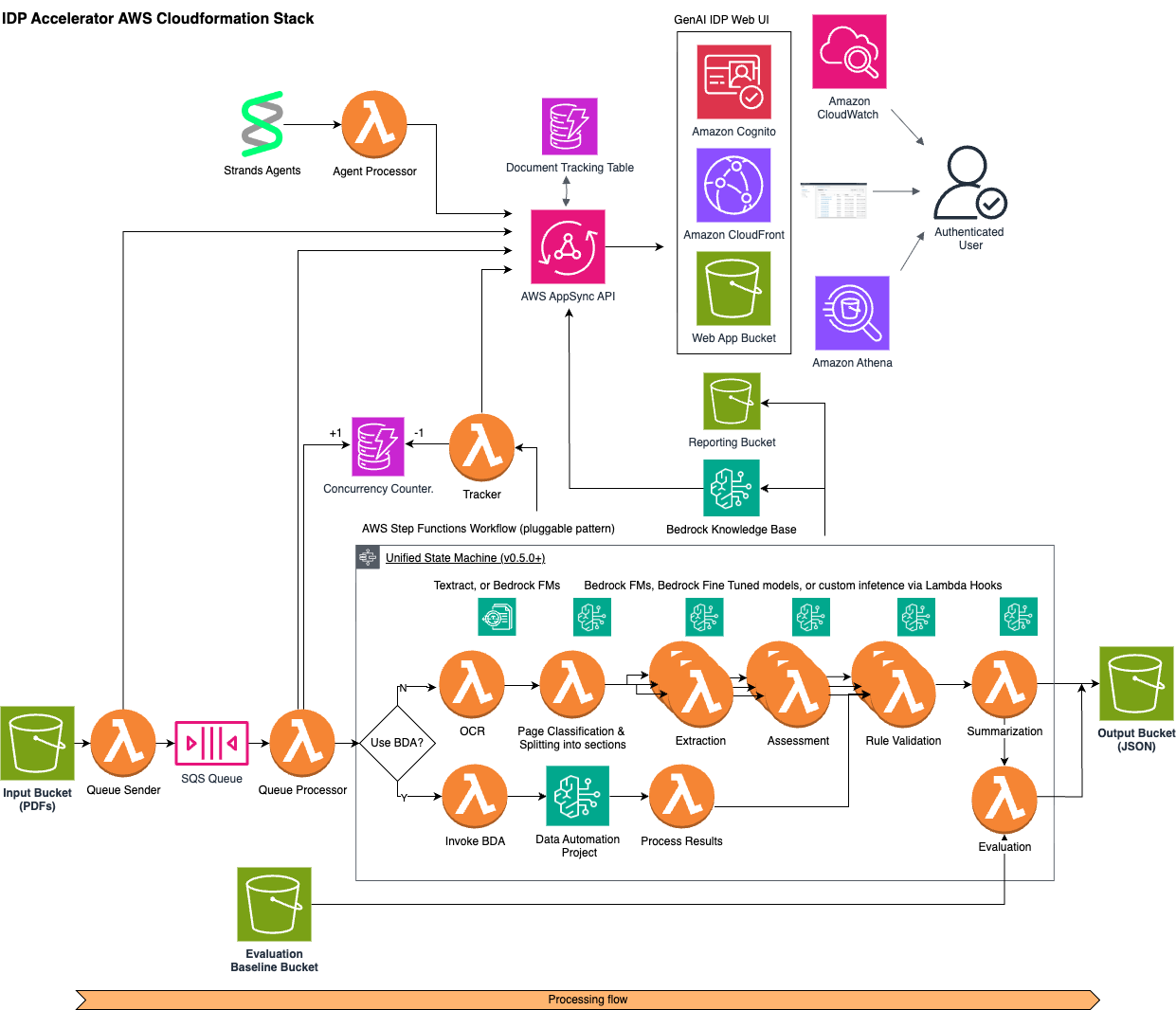
Section titled “Flow Overview”- Documents uploaded to Input S3 bucket trigger EventBridge events
- Queue Sender Lambda records event in tracking table and sends to SQS
- Queue Processor Lambda:
- Picks up messages in batches
- Manages workflow concurrency using DynamoDB counter
- Starts Step Functions executions
- Step Functions workflow runs the steps defined in the selected pattern to process the document and generate output in the Output S3 bucket
- Workflow completion events update tracking and metrics
Components
Section titled “Components”- Storage: S3 buckets for input documents and JSON output
- Message Queue: Standard SQS queue for high throughput
- Functions: Lambda functions for queue operations
- Step Functions: Document processing workflow orchestration
- DynamoDB: Tracking and concurrency management
- CloudWatch: Comprehensive monitoring and logging
- Web UI: Browser-based interface for document management and visualization
- CloudFront distribution for global availability (default), or ALB for VPC-based hosting (see ALB Hosting)
- Cognito user authentication
- GraphQL API for UI-backend interactions
- Evaluation: Document processing accuracy assessment system
- Document Knowledge Base: Optional Bedrock Knowledge Base for document querying
Modular Design Overview
Section titled “Modular Design Overview”The solution uses a modular architecture with nested CloudFormation stacks to support multiple document processing patterns while maintaining a common infrastructure for queueing, tracking, and monitoring. This design enables:
- Support for multiple processing patterns without duplicating core infrastructure
- Easy addition of new processing patterns without modifying existing code
- Centralized monitoring and management across all patterns
- Pattern-specific optimizations and configurations
- Optional features that can be enabled across all patterns:
- Document summarization (controlled by configuration
summarization.enabledproperty)- This feature also enables the “Chat with Document” functionality
- This feature does not use the Bedrock Knowledge Base but stores a full-text text file in S3
- Document Knowledge Base (using Amazon Bedrock)
- Automated accuracy evaluation against baseline data
- Document summarization (controlled by configuration
Stack Structure
Section titled “Stack Structure”Main Stack (template.yaml)
Section titled “Main Stack (template.yaml)”The main template handles all pattern-agnostic resources and infrastructure:
- S3 Buckets (Input, Output, Working, Configuration, Evaluation Baseline)
- SQS Queues and Dead Letter Queues
- DynamoDB Tables (Execution Tracking, Concurrency, Configuration)
- Lambda Functions for:
- Queue Processing
- Queue Sending
- Workflow Tracking
- Document Status Lookup
- Evaluation
- UI Integration and API Resolvers
- CloudWatch Alarms and Dashboard
- SNS Topics for Alerts
- Web UI Infrastructure:
- CloudFront Distribution (default) or Application Load Balancer (ALB Hosting)
- S3 Bucket for static web assets
- CodeBuild project for UI deployment
- Authentication:
- Cognito User Pool and Client
- Identity Pool for secure AWS resource access
- AppSync GraphQL API for UI-backend communication
Pattern Stacks (patterns/*)
Section titled “Pattern Stacks (patterns/*)”Each pattern is implemented as a nested stack that contains pattern-specific resources:
- Step Functions State Machine
- Pattern-specific Lambda Functions:
- OCR Processing
- Classification
- Extraction
- Pattern-specific CloudWatch Dashboard
- Model Endpoints and Configurations
For detailed information about configuration capabilities, see configuration.md.
Unified Pattern Architecture
Section titled “Unified Pattern Architecture”The solution uses a Unified Pattern that combines both BDA and pipeline processing modes into a single deployment. The use_bda configuration flag (set via the UI) controls which processing path is used at runtime:
- Pipeline mode (
use_bda: false, default) — OCR → Classification → Extraction → Assessment → Rule Validation → Summarization → Evaluation - BDA mode (
use_bda: true) — BDA Invoke → BDA Process Results → Rule Validation → Summarization → Evaluation
Shared Processing Steps
Section titled “Shared Processing Steps”Both modes share a common tail in the workflow:
- HITL Check — Routes documents to human review if confidence is below threshold
- Rule Validation — Applies configurable business rules (when enabled)
- Summarization — Generates document summaries using Bedrock LLM
- Evaluation — Compares results against ground truth baselines (when available)
Deployment
Section titled “Deployment”For detailed information on deploying this solution, see deployment.md.
The unified pattern is deployed as a single nested stack (PATTERNSTACK) containing all 12 Lambda functions for both processing modes. There is no pattern selector parameter — the processing mode is controlled entirely by the use_bda configuration flag set via the UI.
Note: The separate Pattern 1 and Pattern 2 deployments have been deprecated in favor of this unified architecture. See pattern-1.md and pattern-2.md for historical reference.
Integrated Monitoring
Section titled “Integrated Monitoring”The solution creates an integrated CloudWatch dashboard that combines metrics from both the main stack and the selected pattern stack:
-
The main stack creates a dashboard with core metrics:
- Queue performance
- Overall workflow statistics
- General error tracking
- Resource utilization
-
Each pattern stack creates its own dashboard with pattern-specific metrics:
- OCR performance
- Classification accuracy
- Extraction stats
- Model-specific metrics
-
The
DashboardMergerLambda function combines these dashboards
For detailed information about monitoring capabilities, see monitoring.md.
Web UI Architecture
Section titled “Web UI Architecture”The solution includes a React-based web user interface for document management and visualization:
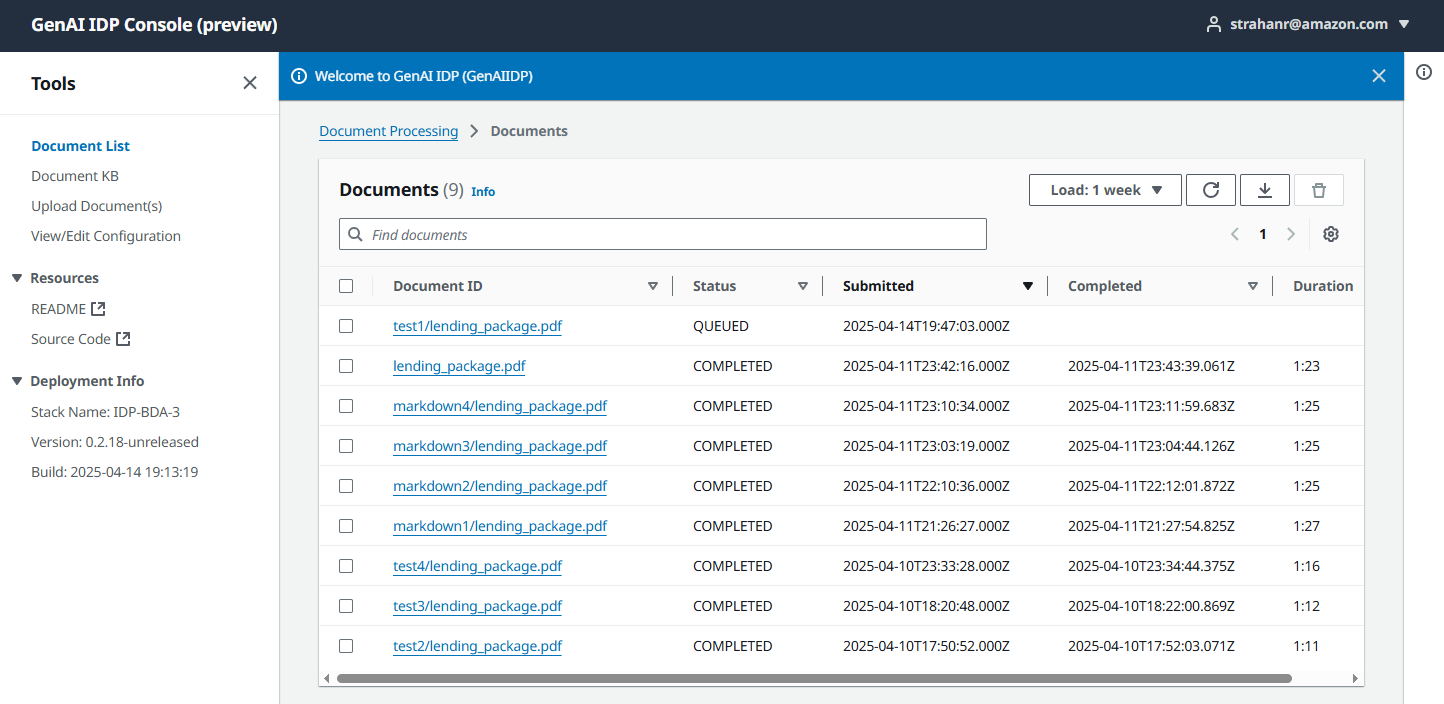
For detailed information about the Web UI, its features, and usage, see web-ui.md.
- Authentication: Amazon Cognito provides secure user authentication and authorization
- Admin users are created during deployment
- Optional self-signup can be enabled with domain restrictions
- Identity pools provide secure, temporary AWS credentials
- Content Delivery: CloudFront distribution serves the static web assets (default), or an Application Load Balancer for VPC-based hosting (see ALB Hosting)
- Global availability and low latency (CloudFront) or private network access (ALB)
- WAF integration for added security (optional)
- Geographical restrictions can be applied
-
API Layer: AppSync GraphQL API connects the UI to backend services
- Real-time data with subscriptions
- Secure access control through Cognito and IAM
- Lambda resolvers for complex operations
-
Document Operations: The UI supports:
- Document upload and S3 presigned URL generation
- Status tracking and results visualization
- Configuration management
- Knowledge base querying (when enabled)
Optional Features
Section titled “Optional Features”Document Summarization
Section titled “Document Summarization”When enabled via the configuration summarization.enabled property (default: true), the solution provides document summarization across all patterns:
- All patterns use a dedicated summarization step with Bedrock models
- Summarization provides a concise overview of the document content
- Results can be viewed in the Web UI and downloaded or printed
- Configuration settings control summarization behavior per pattern
Document Knowledge Base
Section titled “Document Knowledge Base”The solution optionally integrates with Amazon Bedrock Knowledge Base:
- Processed documents are indexed in a knowledge base
- Enables natural language querying of document content
- Supports various Bedrock models (Amazon Nova, Anthropic Claude)
- GraphQL API integration allows querying from the UI
For detailed information about the Knowledge Base integration, see knowledge-base.md.
Accuracy Evaluation
Section titled “Accuracy Evaluation”The solution includes a comprehensive evaluation system:
- Baseline Data: Ground truth data stored in the evaluation baseline bucket
- Automatic Evaluation: When enabled, each processed document is automatically evaluated against baseline data if available
- Metrics:
- Extraction accuracy for key-value pairs
- Classification accuracy across document types
- Summarization quality assessment
- UI Integration: Results visualized in the web interface
- CloudWatch Metrics: Aggregated accuracy metrics for monitoring
For detailed information about the evaluation system, see evaluation.md.
Bedrock Guardrails Integration
Section titled “Bedrock Guardrails Integration”The solution supports optional Amazon Bedrock Guardrails integration:
- Define content boundaries for Bedrock model outputs
- Apply guardrails to all Bedrock model interactions across all patterns
- Support for both DRAFT and versioned guardrails
- Configuration parameters:
BedrockGuardrailId- ID of an existing Bedrock GuardrailBedrockGuardrailVersion- Version of the guardrail to use (e.g., DRAFT, 1, 2)
- Guardrails can be applied to:
- Extraction operations
- Summarization (when enabled)
- Knowledge Base interactions (when enabled)
Post-Processing Lambda Hook
Section titled “Post-Processing Lambda Hook”The solution supports an optional post-processing Lambda hook integration:
- Automatically triggered via EventBridge after a document is successfully processed
- Configured via the
PostProcessingLambdaHookFunctionArnparameter - Enables custom downstream processing of document extraction results
- Can be used for integration with other systems such as:
- Enterprise document management systems
- Business process workflows
- Data analytics pipelines
- Custom notification systems
- Receives the document processing details and output location
For comprehensive implementation guidance, use cases, and code examples, see post-processing-lambda-hook.md.
Additional Documentation
Section titled “Additional Documentation”- classification.md - Details on document classification capabilities
- extraction.md - Details on data extraction capabilities
- troubleshooting.md - Troubleshooting guidance and common issues