GenAI IDP Accelerator
Open source · runs in your AWS account

From document packets to data you can trust

The GenAI IDP Accelerator turns unstructured documents into structured, validated data. It splits a packet into its documents, classifies each one and extracts the fields you define. Every value gets a confidence score and its location on the page, and a person reviews the ones that need it. It runs serverless at any volume, in your own AWS account.

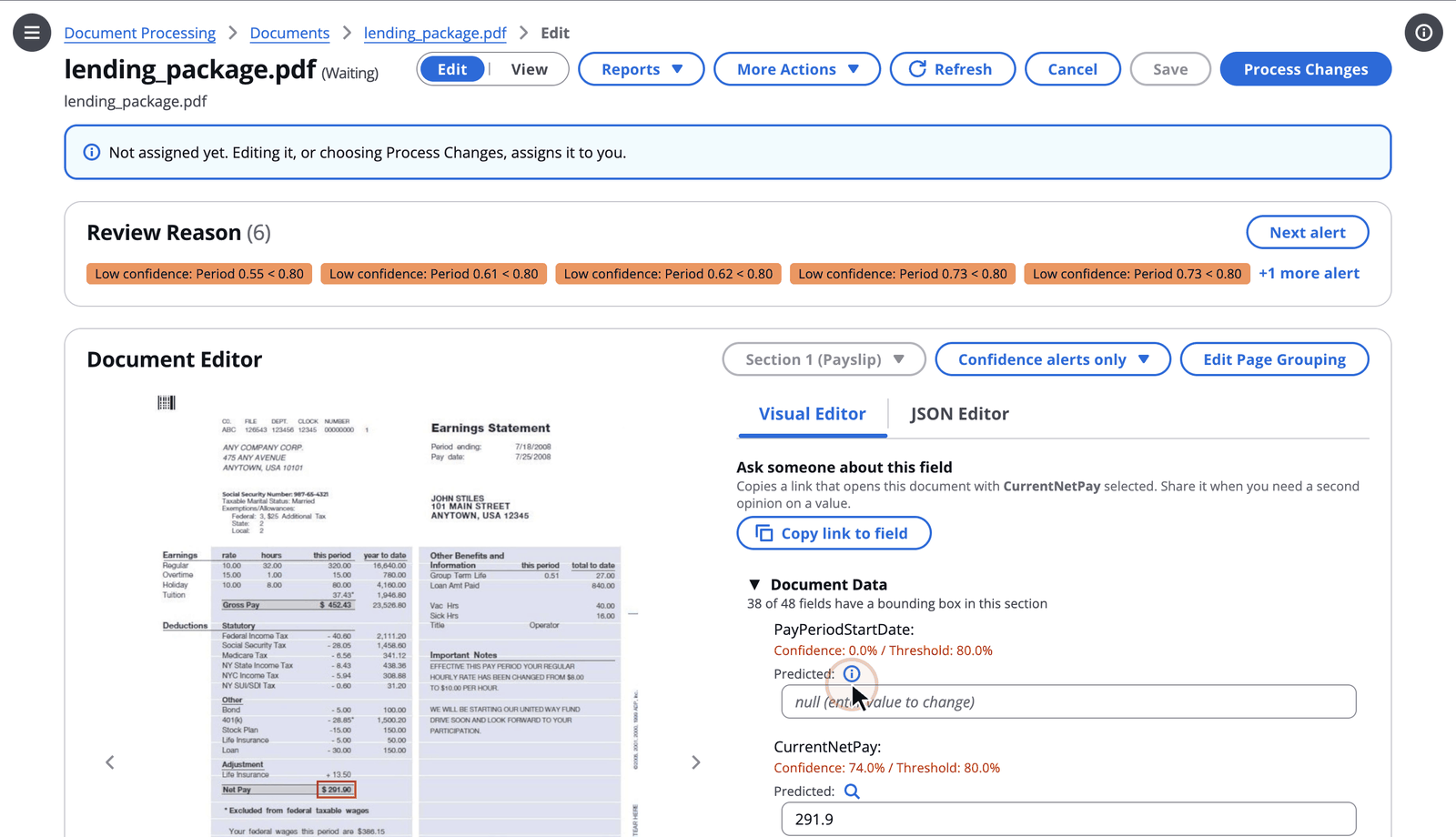
A processed lending packet in the web UI: review reasons for low-confidence fields, the page image with the selected value highlighted, and each extracted value with its confidence against its threshold
Built for documents like
Lending packetsBank statementsW-2s and tax formsHealthcare packagesInsurance claimsPassport applicationsYour own document types
Any documentDefine a type by describing it, or from a sample
Two enginesBedrock Data Automation, or Textract plus Bedrock
Your accountDocuments, models and keys stay with you
MIT-0Open source, change anything
Watch

See it in action

Narrated, captioned demos recorded on a test deployment, using the sample documents that ship with the accelerator.

The GenAI IDP Accelerator: from documents to decisions (8:00)

For new viewers, the whole product through one lending packet. Describe a new document type and get a working configuration, then upload the packet. It's split into documents, classified and extracted, with a confidence score and a page location for each field. A low-confidence value is corrected in a review queue, and accuracy is measured against ground truth in Test Studio. Then you ask questions across every processed document, see what each one cost, and reach it all from the CLI, the SDK, MCP and extensions.

Set up a new document type (2:00)

Discovery reads a sample invoice and drafts a document class, with its nested groups and line-item table, beside the class Quick Start created. Then the revision history shows exactly what Discovery added.

Inside a processed document (2:39)

The lending packet in detail: its sections and page classes, each field with its confidence and place on the page, the summary and processing report, every retained version, and a chat with the document that catches a pay slip and a W-2 naming different employees.

Human review with review queues (2:38)

An Admin adds an annotator to the review queue and assigns a document. The annotator works it against the page, and hands back one that needs reprocessing rather than new values, with a reason kept in its history.

Measure accuracy with Test Studio (2:12)

Test sets from public datasets, two runs of the same W-2 forms with different extraction models, field-level accuracy that shows where each model struggles, and a side-by-side comparison of accuracy and cost.

Ask your documents (2:25)

Agent Chat builds a table of processed documents and refines it in conversation, the error analyzer names the root cause of a failed document from its logs and traces, and the Knowledge Base answers from the documents, saying so when they don't hold the answer.

Operate it at scale (2:11)

The pricing behind every cost estimate, capacity planning from the tokens real documents used, checked against live Bedrock service quotas, and routing documents and tenants to their own configuration.

All demo videos

Set up

A new document type in minutes, not a project

A fresh deployment doesn't know your documents yet. Describe them, show it one, or start from a preset. Every change is saved as a revision that you can test before it goes live.

Quick Start

Describe your documents, get a working configuration

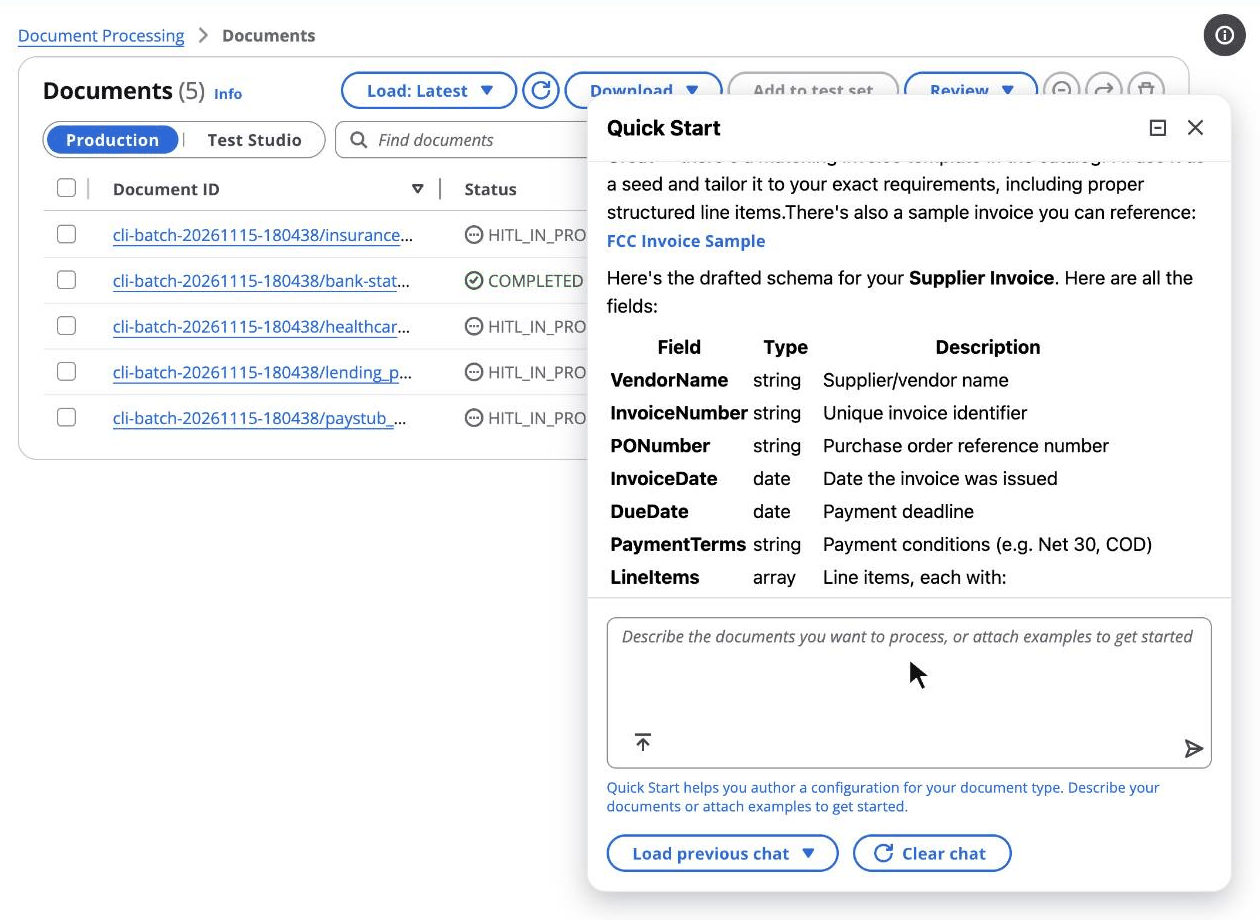
Tell Quick Start what you process, for example "commercial invoices with line items, totals and payment terms". It proposes the document classes and fields, refines them with you in conversation, and activates the configuration. You don't edit a schema by hand.

Why it matters

The first useful result comes from a conversation, not from learning a schema format.
Quick Start

Quick Start proposing a Supplier Invoice class and its fields from a plain-language description
Discovery

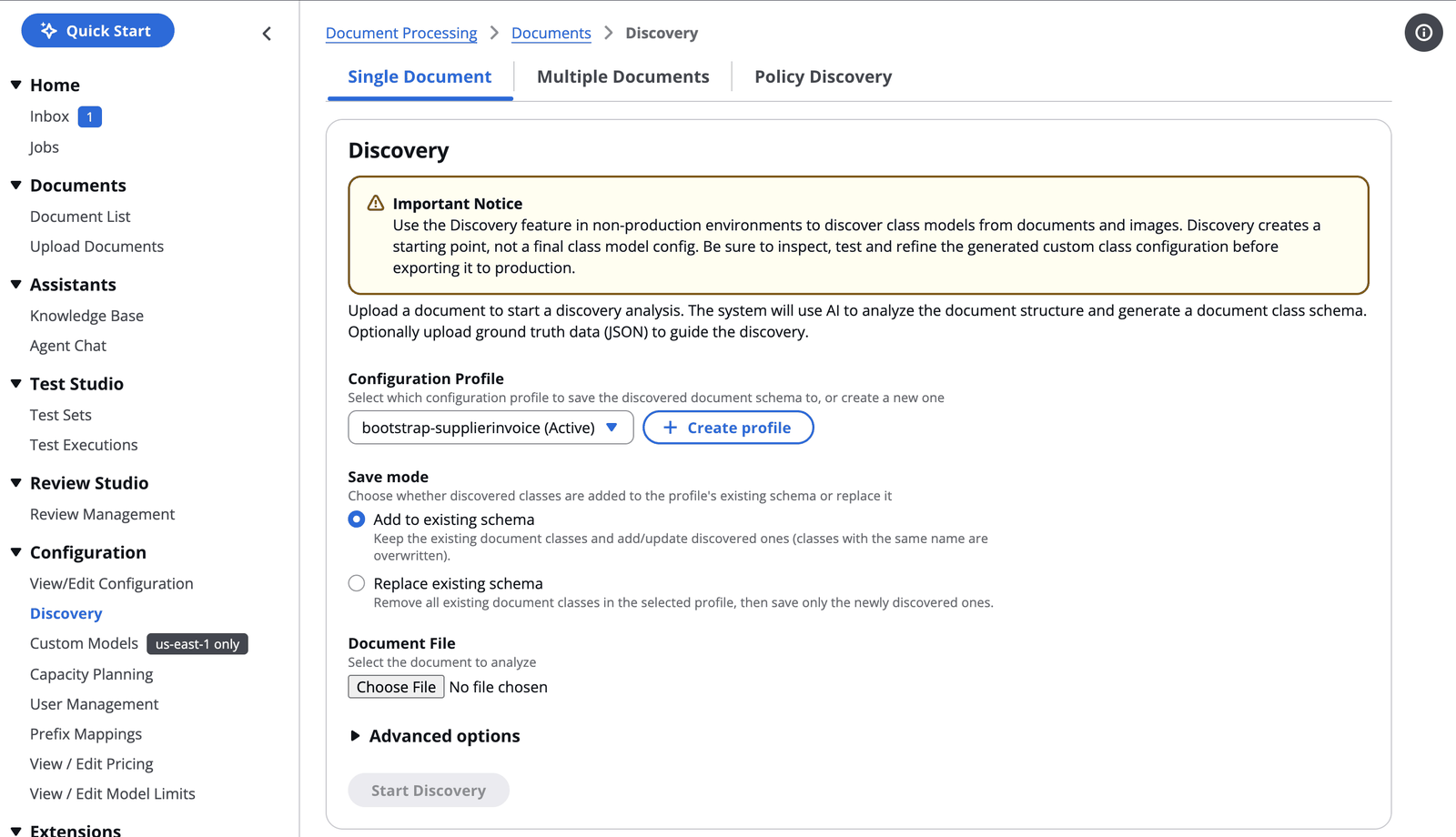
Show it a sample, and it drafts the schema

Discovery reads a sample document, or several of the same kind, and identifies its structure: the fields, their types, groups and tables. It turns them into a document class you can edit. In BDA mode it creates and manages the Bedrock Data Automation blueprints as well.

Why it matters

The schema starts from your real documents, so nothing on the page is left out by accident.

Discovery

Discovery: upload a sample document to generate a document class in a configuration profile
Configuration profiles

Many use cases in one deployment, every change kept

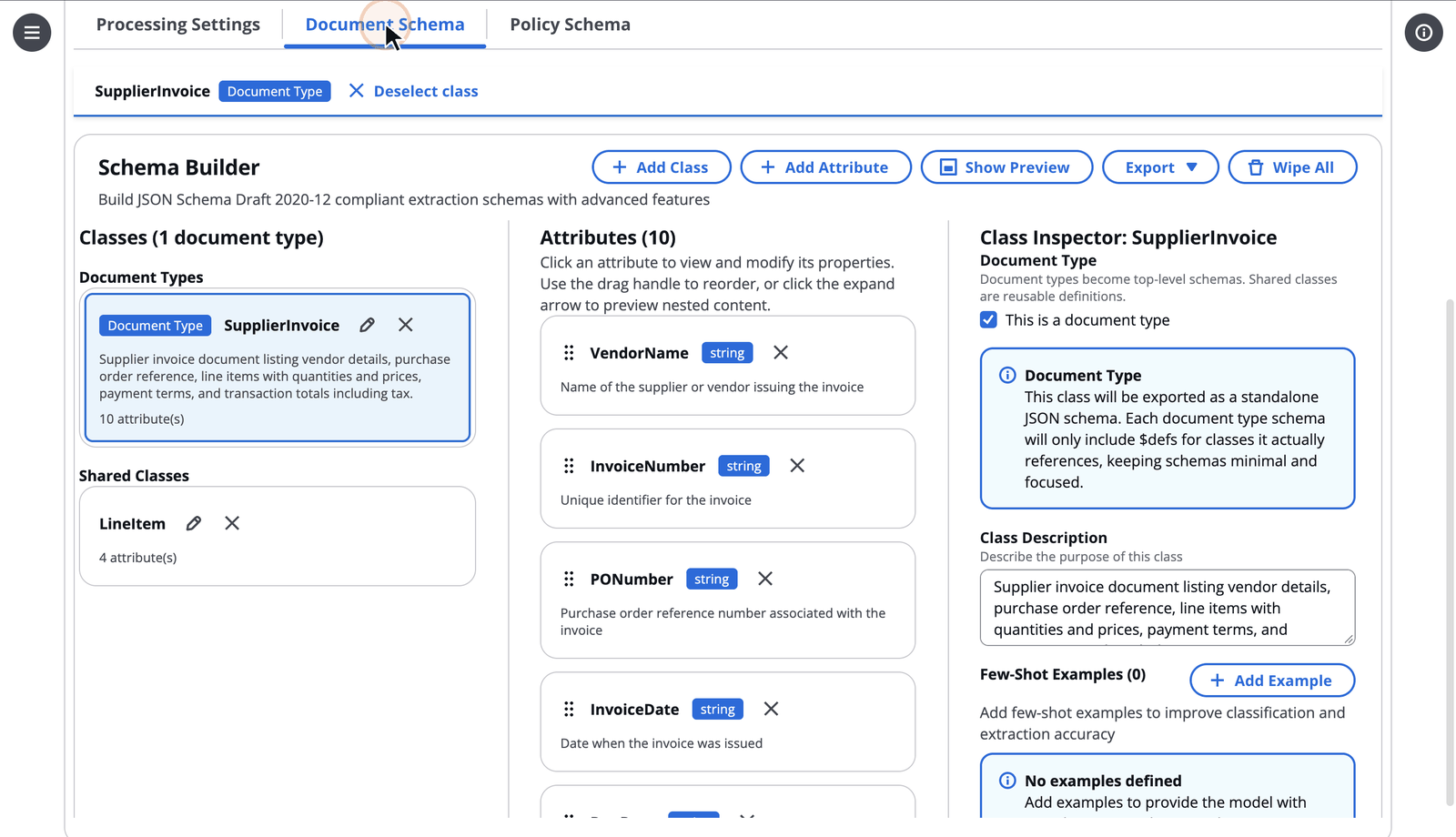
Each named configuration profile holds its own classes, prompts, models and rules, with a revision history. Route documents to a profile by S3 prefix, compare revisions setting by setting, and roll back without redeploying. Presets for bank statements, lending packets, W-2s, healthcare packages and more give you a running start.

Why it matters

Teams change prompts and models with confidence, because every document records the exact configuration that produced it.

Configuration profiles

The Schema Builder showing the SupplierInvoice class Quick Start created, with its attributes and the shared LineItem class
Process

Every field, with its evidence

Upload through the web UI, drop files in S3, or send a batch from the CLI. The accelerator queues, throttles and retries for you, and shows you why it produced every value.

Classification

One upload, many documents

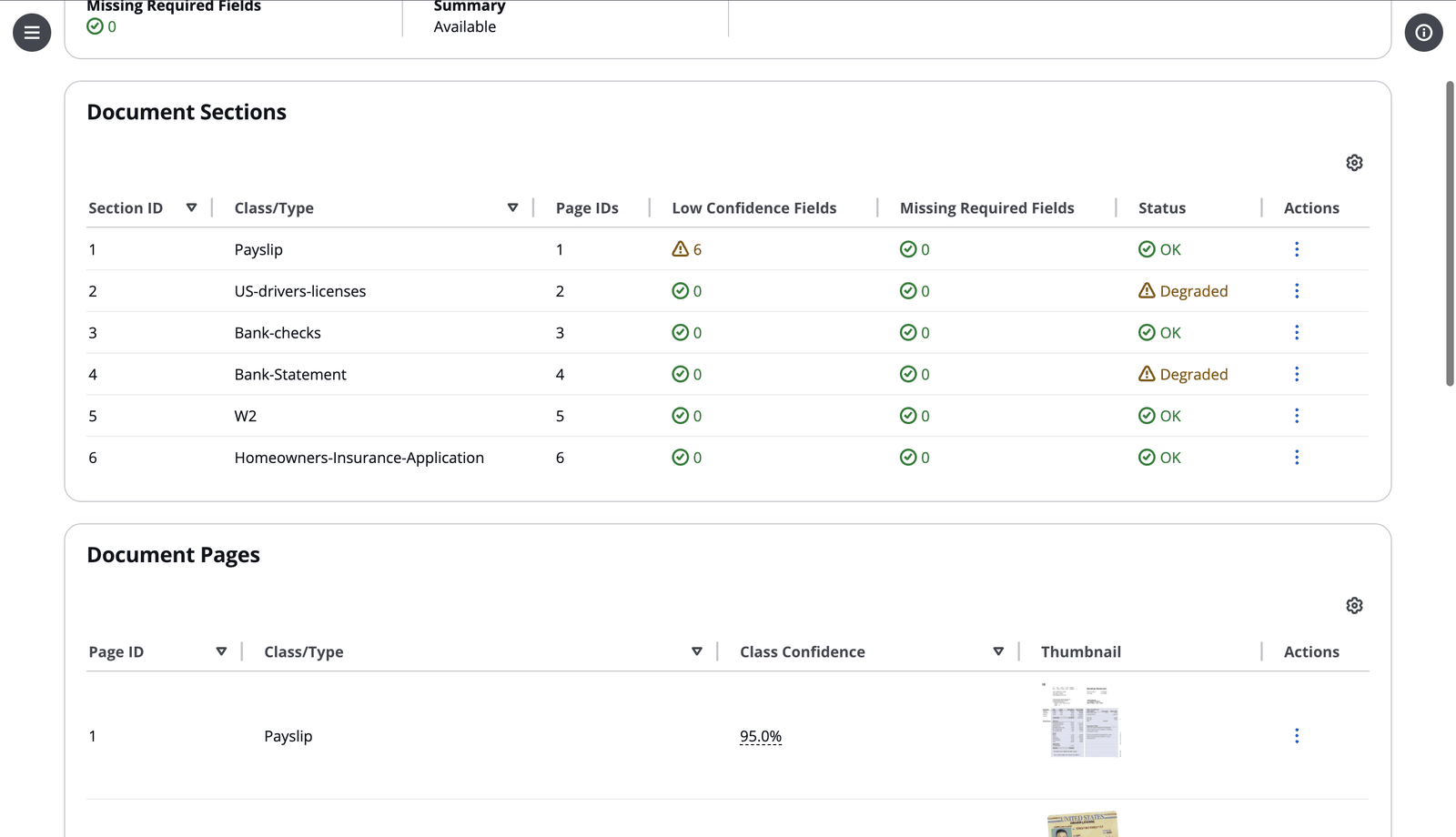
A lending packet arrives as one PDF that holds a W-2, a bank statement, a pay stub and a driver's license. The accelerator finds where each document starts and ends, classifies each section, and processes it with that class's schema. Classify a page at a time or a whole packet at a time, and add few-shot examples where classes look alike.

Why it matters

Mixed packets need no pre-sorting. They come out as separate, correctly typed documents.

Classification

The lending packet split into six sections, each with its document class, pages, low-confidence and missing fields, and status
Extraction and confidence

Structured data, a confidence score and the place on the page

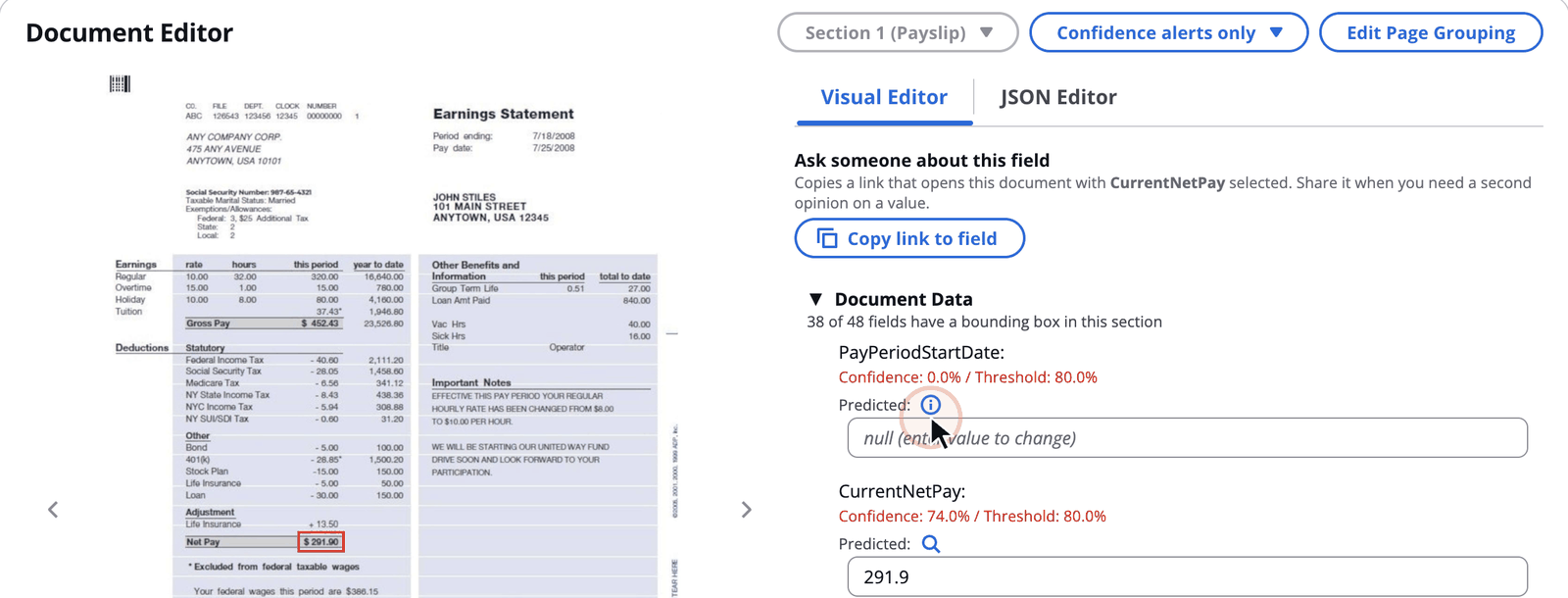
Each section's fields are extracted to your JSON Schema, including nested groups and tables hundreds of rows long. Agentic extraction parses tables deterministically and checks its own output for completeness. Every value gets a confidence score and a bounding box on the page, so you can see at a glance which values to trust and where they came from.

Choose the engine per configuration: Bedrock Data Automation end to end, or Amazon Textract OCR with the Amazon Bedrock model you pick for each step.

Why it matters

Downstream systems get data they can act on, and reviewers check only the values that need a look.

Extraction and confidence

Extracted fields with confidence scores, and the selected field highlighted on the page image
Also in the pipeline

More checks and controls, configured rather than coded

Rule validation

Check each document against business rules written in plain language, such as matching names across a packet, with a verdict and its reasoning. Arithmetic and threshold rules can go to the Z3 solver for a deterministic answer.

Bedrock Data Automation

Switch a profile to BDA mode and Bedrock Data Automation does OCR, classification and extraction end to end. The review, evaluation and analytics stay the same.

Few-shot examples

Attach example pages to a class when similar documents need telling apart, and extraction learns from them too.

Document versions

Every processing run is kept as an immutable version you can view, compare and download, so reprocessing never loses a result.

Lambda hooks

Inject your own logic before or after a step: custom prompts, post-processing, or a call into another system.

Evaluation and calibration

Field-level accuracy against ground truth, with confidence calibration that shows whether a 90% score really means 90%.

Human review

People review only the values that need it

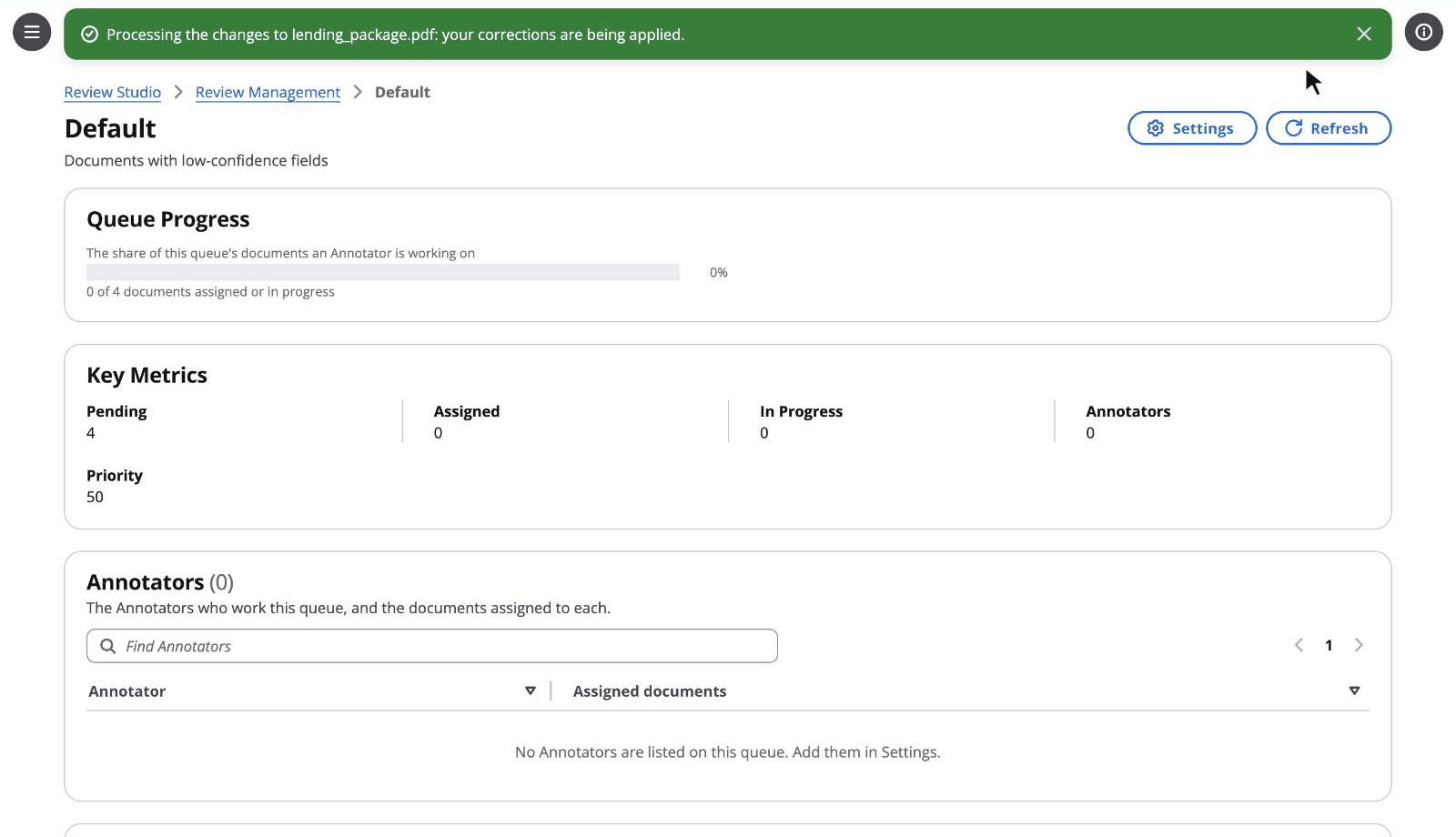
A document with a low-confidence field, or a required field left empty, waits in a review queue with the reasons it's there. An Admin assigns it, and an Annotator corrects the values against the page and processes the changes. A finalize run produces the corrected outputs, and every earlier version stays on record.

Why it matters

Straight-through processing for the easy majority, a person in the loop for the rest, and an audit trail for both.

Review queues

The Default review queue with documents waiting for review, its progress and its annotators
Test Studio

Know your accuracy before you change production

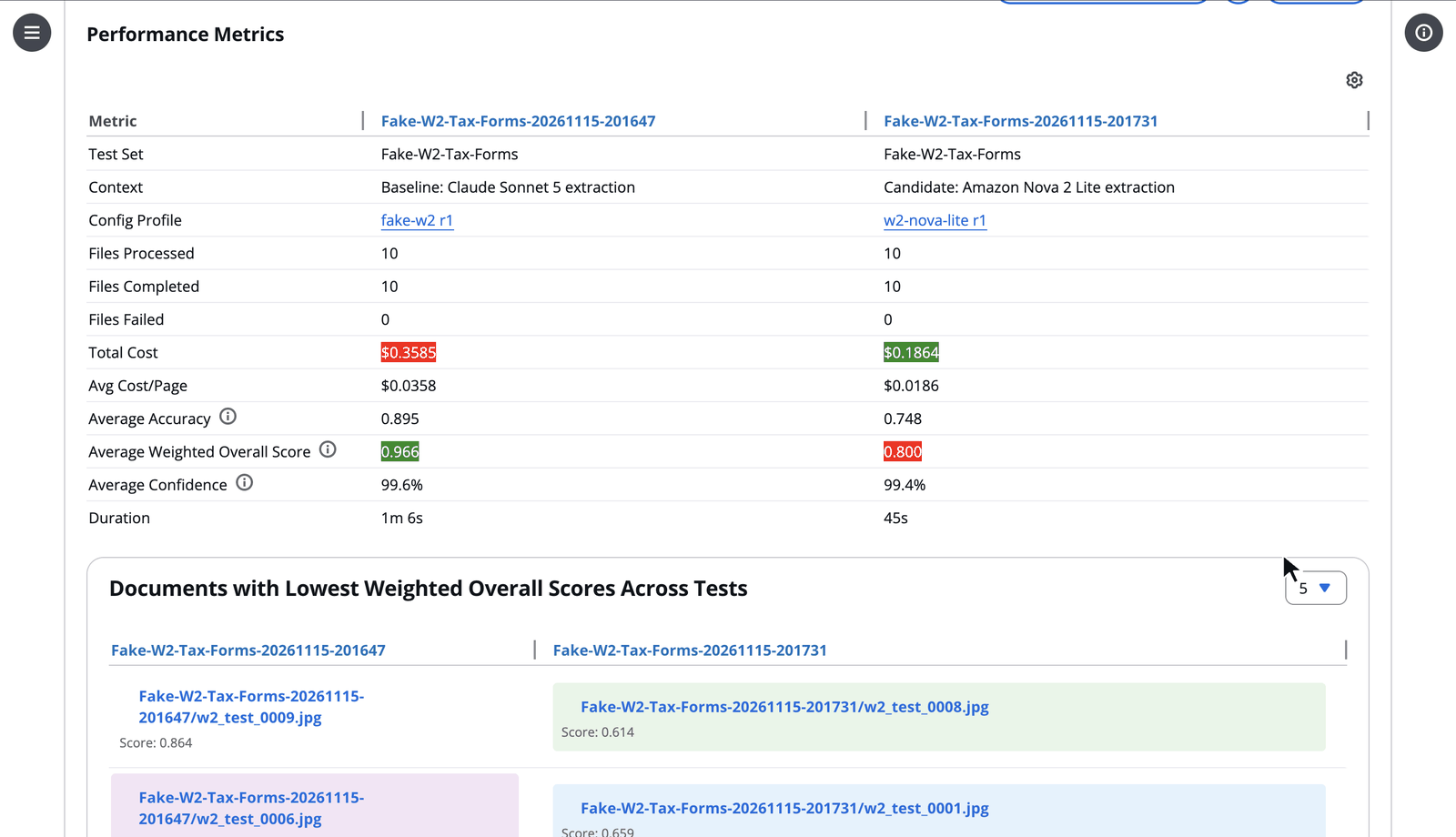
Build a test set from processed documents, from a labeled dataset, or by generating synthetic documents. Run it against any configuration revision and read the accuracy field by field, alongside cost and confidence calibration. Compare two runs side by side to see exactly what a new prompt or model changed.

Why it matters

Model and prompt choices become measured decisions, not guesses.

Test Studio

Two Test Studio runs of ten W-2 forms compared: accuracy, cost per page, confidence and duration for two extraction models
Agents

Ask questions across every document

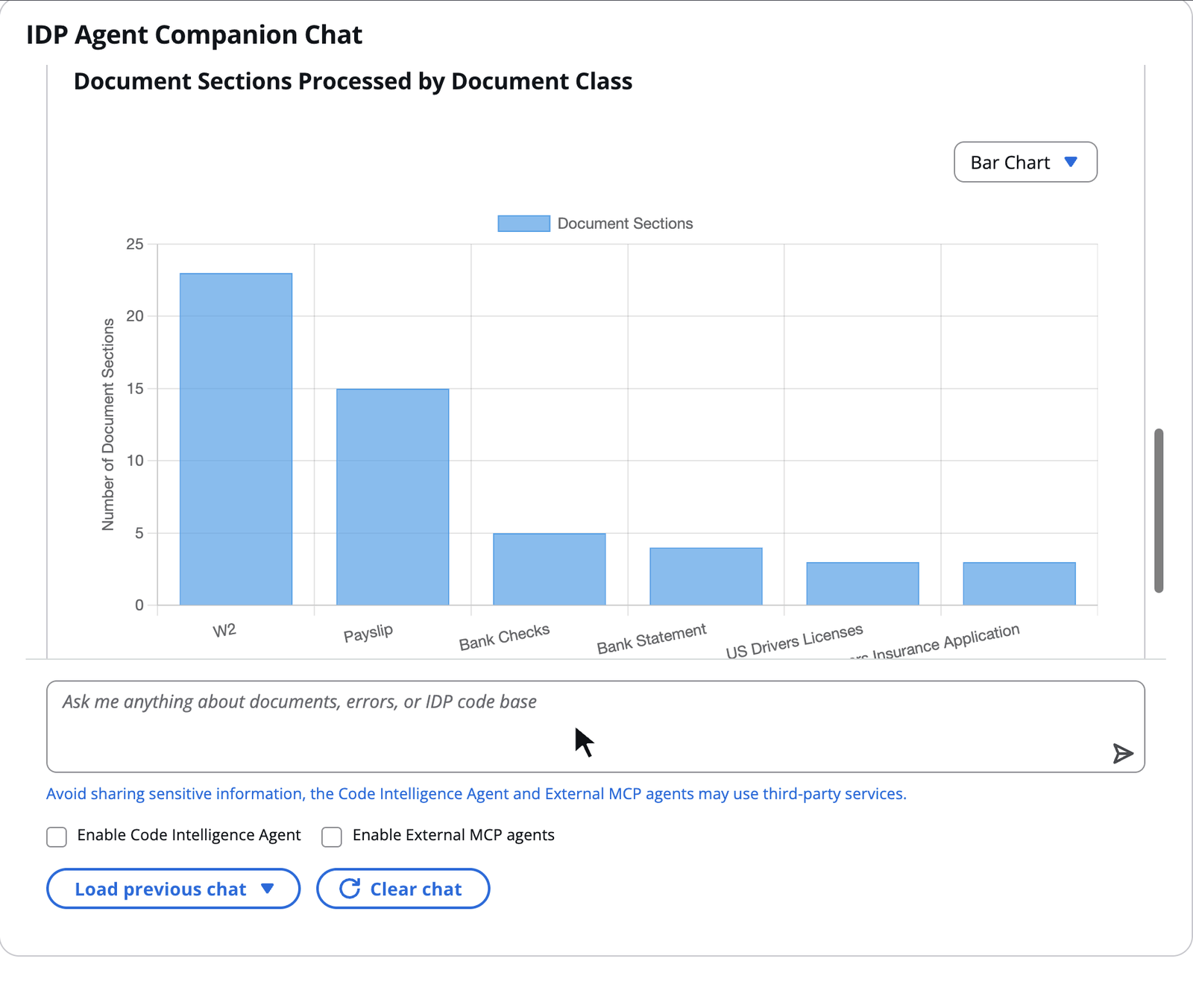
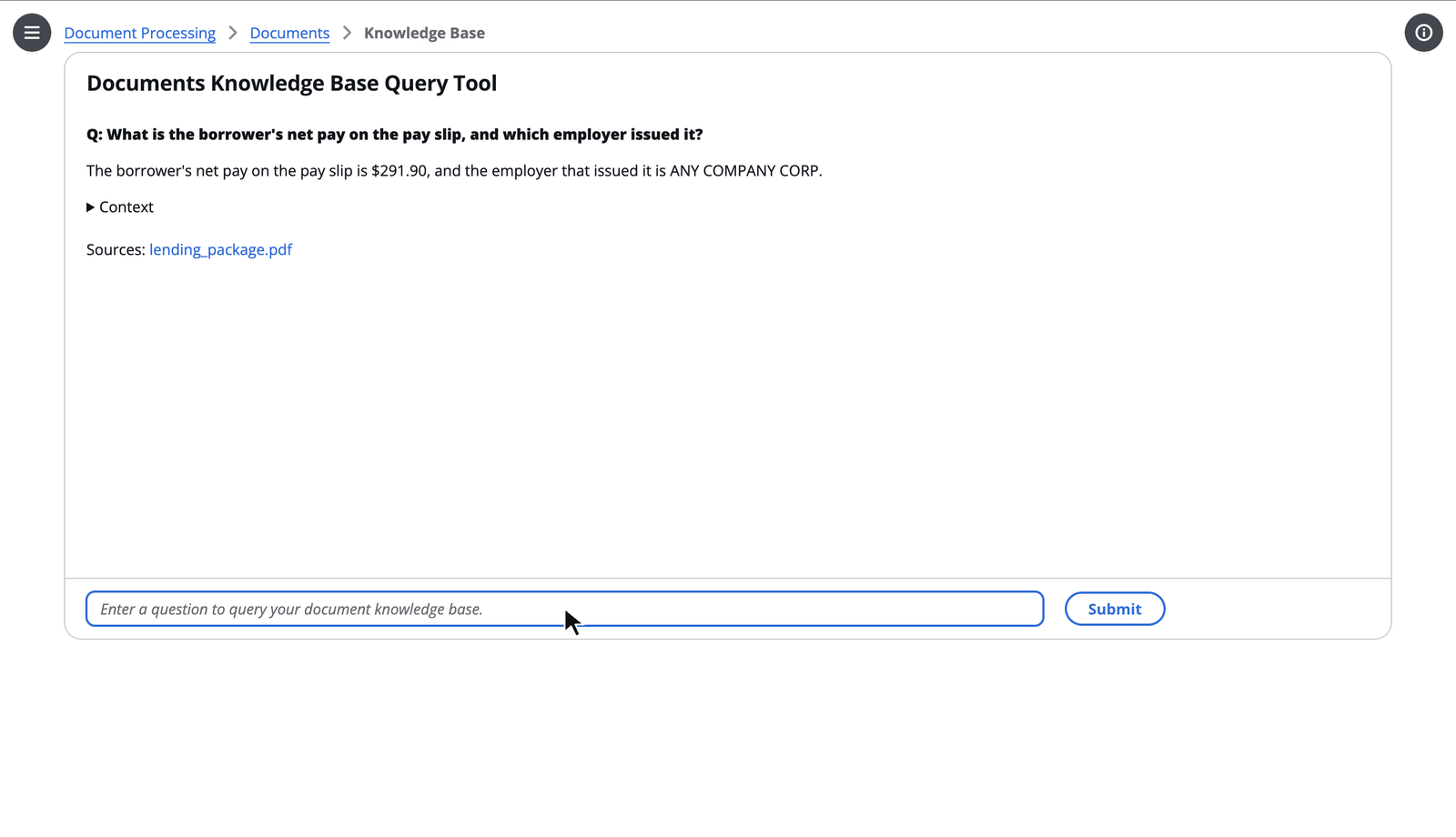
"What was the average loan amount by state last month, and which documents had low-confidence income fields?" Agent Chat writes and runs the query over your processing results and answers with tables and charts. The Knowledge Base answers questions about what the documents say, with links to the sources. When a document fails, the Error Analyzer reads the logs and traces and explains why.

Why it matters

Analysts and operators get answers in plain language, without writing SQL or digging through logs.

Agent Companion Chat

Agent Chat answering an analytics question with a chart
The Knowledge Base answering a question with links to source documents
Analytics across documents, and questions about their contents
Trust

Under your control, down to the cent

Built for teams that have to answer "who can see this document, and what did it cost?"

Transparent cost

See what every document cost

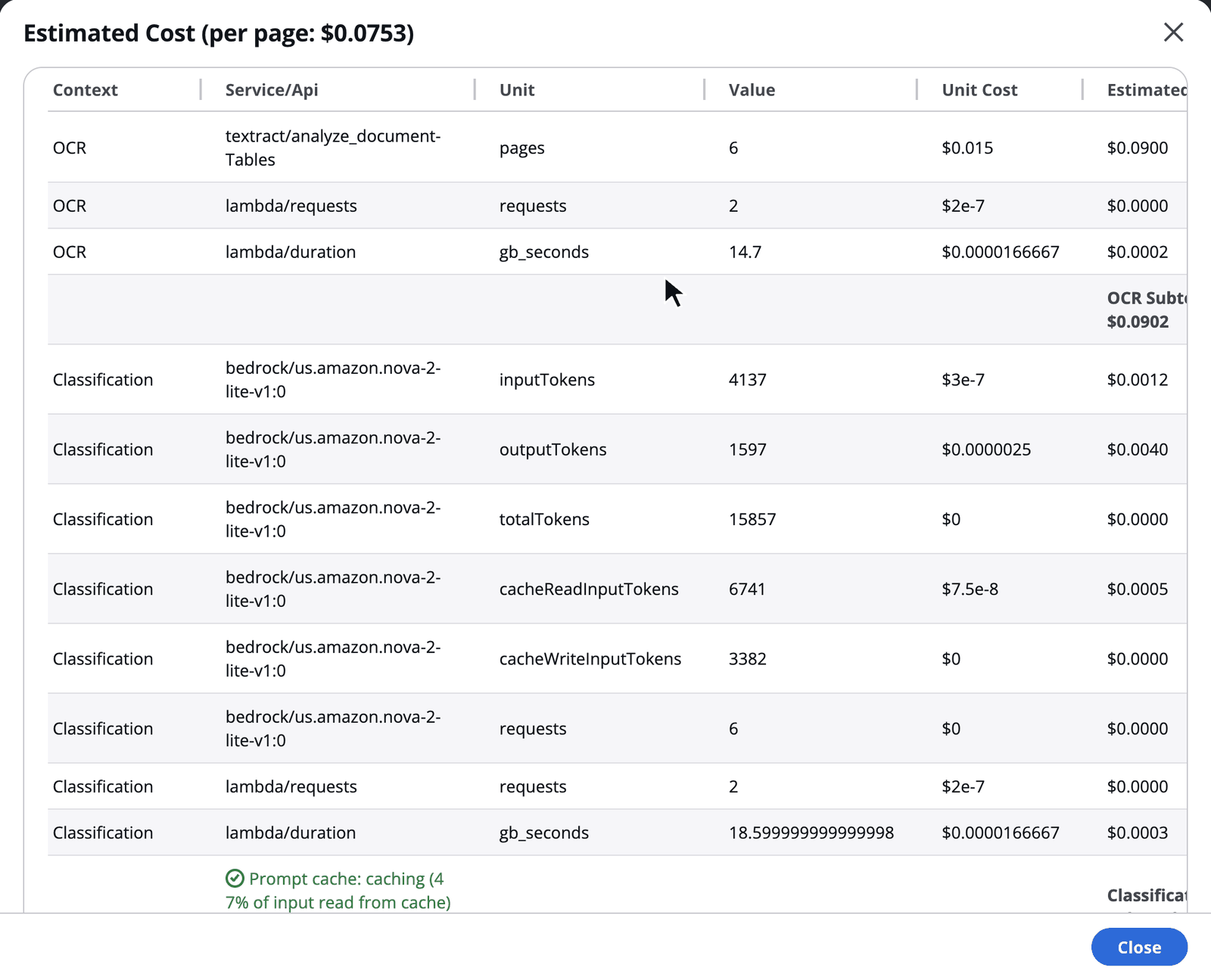
Each document shows an itemized estimate of its cost: OCR pages, model tokens for each step and Bedrock Data Automation pages, at list prices that administrators can replace with their own rates. Capacity planning turns your expected volume into the throughput and service quotas you'll need.

Why it matters

No per-page licence. You pay only for the AWS services each document uses, and you can see where the money goes.

Cost considerations

A document's estimated cost, itemized by service and processing step, with the cost per page
Access control

The right people see the right documents

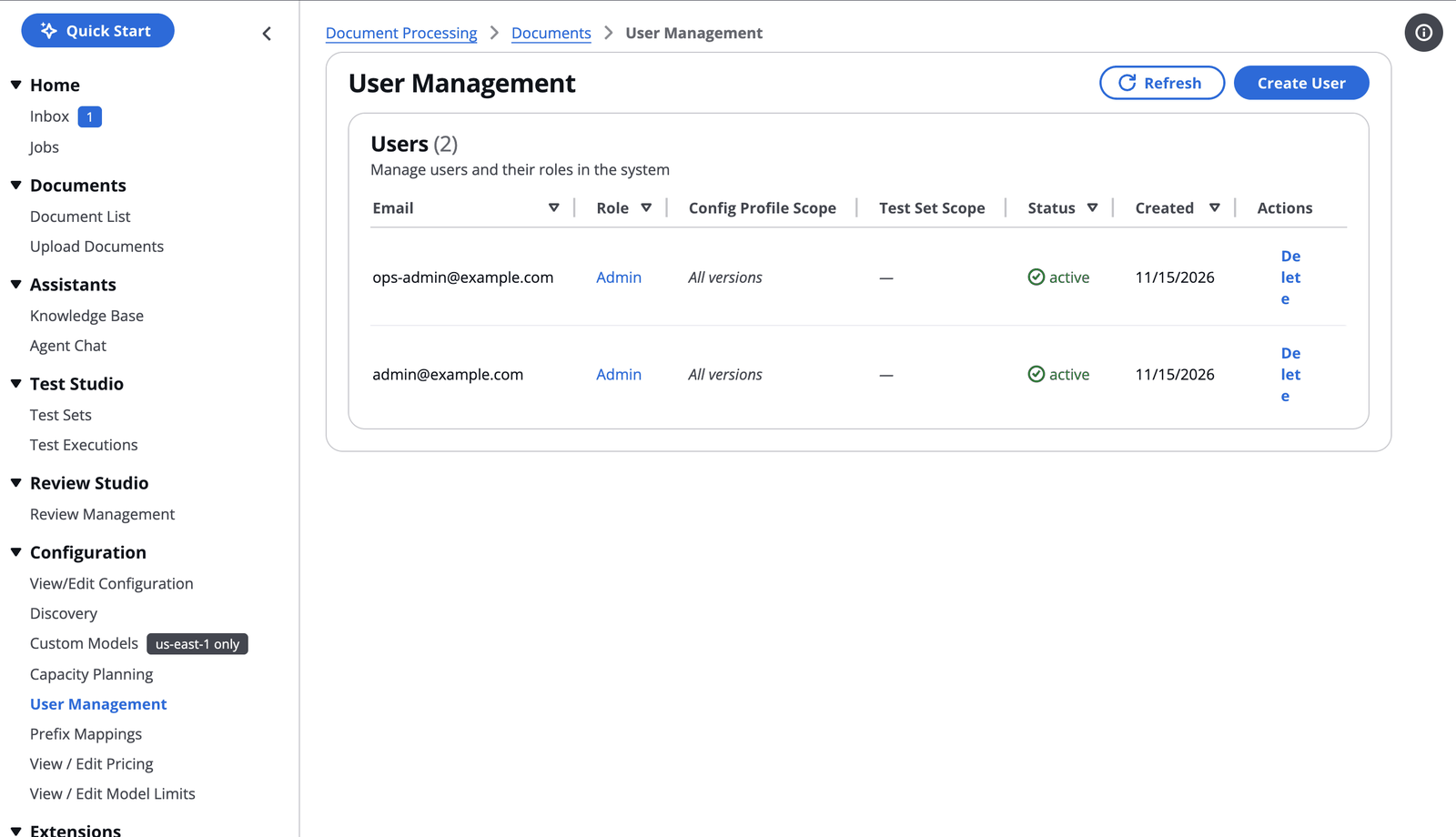
Admin, Author, Reviewer, Annotator and Viewer roles are enforced on the server, at the API. Scope a user to the configuration profiles of their use case, or keep each tenant's documents visible only to that tenant's users in one shared deployment. Sign in with Cognito or federate your own identity provider.

Why it matters

One deployment can serve several teams or customers without one seeing another's documents.

Role-based access control

User Management listing users with their roles and allowed configuration profiles
Build on it

Beyond the web UI, into your systems

Everything the UI does is available from code, from your AI tools, and through extensions you install into a running stack.

CLI, SDK and MCP

Automate it from code and from your agents

The idp-cli deploys and updates stacks, sends batches, monitors progress and downloads results. The Python SDK gives your applications the same operations. The built-in MCP server lets Amazon Quick Suite query your documents and analytics directly, signed in through OAuth, and the MCP connector brings the same tools to IDE assistants such as Kiro and Cline.

Why it matters

Document processing fits into existing pipelines and AI assistants, rather than sitting beside them.

IDP CLI   IDP SDK   MCP server

Batch processing with live progress from the IDP CLI
Extensions

Add capabilities without forking the code

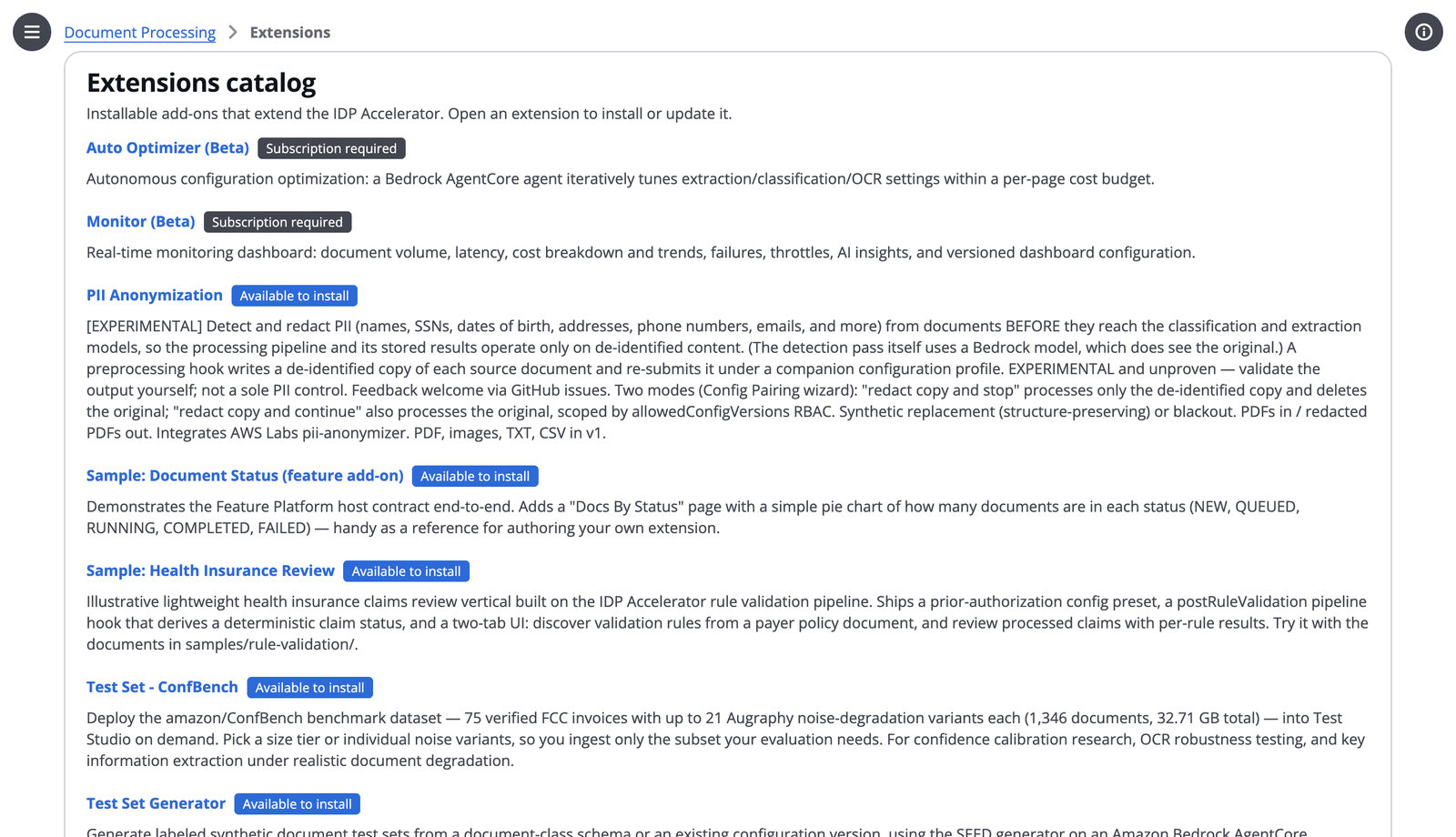
Install extensions into a running deployment, each with its own pages and pipeline hooks. PII Anonymization redacts personal data before the models see a page, the Data Generator creates labeled synthetic test documents, and the Auto Optimizer tunes prompts and models against a cost-per-page budget. The Feature Platform SDK lets you build your own.

Why it matters

You add what your use case needs and keep taking upgrades.

Feature Platform

Installed extensions in the web UI
Why the accelerator

Yours to run, yours to shape

Runs in your AWS account

Documents, results and models stay in your account and Region, encrypted at rest. Deploy into a private network, a VPC-secured mode, or AWS GovCloud (US).

Serverless at any volume

Lambda, Step Functions, SQS and DynamoDB scale from one document to millions, with queuing, concurrency limits, retries and a circuit breaker built in.

Open source

MIT-0 licensed. Change the prompts, the schemas, the pipeline, or the code itself. Inject your own logic through Lambda hooks.

Your models

Built on Amazon Bedrock. Choose the model for each step, from Amazon Nova to Anthropic Claude, or fine-tune a classifier on your own documents.

Deploy your way

One-click CloudFormation, a generated Terraform or OpenTofu module, the AWS CDK constructs, or headless for API-only use.

Built to be operated

A CloudWatch dashboard, alarms, document versions and a tracking table, so you can always answer "where is this document, and what happened to it?"

Process your first document today

Deploy the accelerator in your own AWS account in under an hour, then upload the sample lending packet and watch it come apart.