Guidance for Troubleshooting of Amazon EKS using Agentic AI workflow on AWS
Summary: This implementation guide provides an overview of the Guidance for Troubleshooting of Amazon EKS using Agentic AI workflow on AWS, its reference architecture and components, considerations for planning the deployment, and configuration steps for deploying the Guidance name to Amazon Web Services (AWS). This guide is intended for solution architects, business decision makers, DevOps engineers, data scientists, and cloud professionals who want to implement this guidance in their environment.
Get Started
Guidance for Troubleshooting of Amazon EKS using Agentic AI workflow on AWS provides a comprehensive solution for intelligent troubleshooting of Amazon Elastic Kubernetes Service (EKS) clusters using AI-powered Agentic workflow technology integrated with Slack for ChatOps powered Platform Engineering
Overview
The Guidance for Troubleshooting of Amazon EKS using Agentic AI workflow on AWS addresses critical need for intelligent, automated troubleshooting in complex Kubernetes environments. As organizations scale their containerized workloads on Amazon EKS, traditional manual troubleshooting approaches become inefficient and error-prone.
It leverages Artificial Intelligence (AI) to analyze cluster logs, identify patterns, and provide actionable troubleshooting recommendations through an intuitive chatbot interface. It offers Strands based framework based agentic troubleshooting system for AI-powered real-time cluster problem resolution.
The solution integrates with AWS Bedrock for natural language processing, Amazon S3 Vectors for search, and provides both web-based and Slack integrations for seamless user interaction. This approach significantly reduces mean time to resolution (MTTR) for EKS cluster issues while improving operational efficiency.
Features and Benefits
The Guidance for Troubleshooting of Amazon EKS using Agentic AI workflow on AWS provides the following features:
Intelligent Log Analysis - Automatically processes and indexes EKS cluster logs using semantic search capabilities, enabling faster identification of root causes and patterns across large volumes of log data.
AI-Powered Troubleshooting - Leverages AWS Bedrock’s large language models to provide contextual troubleshooting recommendations based on cluster state, historical patterns, and best practices.
Multi-Modal Interaction - Supports both web-based Gradio interface and Slack integration, allowing teams to interact with the troubleshooting system through their preferred communication channels.
Real-Time Cluster Monitoring - Continuously monitors EKS cluster health and automatically surfaces potential issues before they impact production workloads.
Automated kubectl Execution - Intelligently executes kubectl commands to gather diagnostic information and implement recommended fixes with proper security controls.
Extensible Agent Framework - Built on AWS Strands agent framework, enabling customization and extension of troubleshooting capabilities for specific organizational needs.
Use cases
DevOps Team Efficiency Improvement
Organizations with large-scale EKS deployments can significantly reduce the time spent on manual log analysis and troubleshooting. The chatbot provides instant access to relevant log data and recommended actions, enabling DevOps engineers to focus on higher-value activities while maintaining cluster reliability.
Incident Response Acceleration
During production incidents, the solution provides rapid diagnosis and resolution recommendations. Teams can query the chatbot using natural language to understand cluster issues, receive step-by-step troubleshooting guidance, and access historical context for similar problems.
Knowledge Transfer and Training
New team members can leverage the chatbot’s knowledge base to understand EKS troubleshooting best practices and learn from historical incident patterns. The solution serves as an intelligent knowledge repository that grows with organizational experience.
Proactive Issue Prevention
The continuous monitoring capabilities enable organizations to identify potential issues before they impact users, supporting a shift from reactive to proactive operational models.
Architecture overview
This section provides a reference implementation architecture diagram for the components deployed with this guidance.
The Guidance for Troubleshooting of Amazon EKS using Agentic AI workflow on AWS implements a sophisticated, multi-layered architecture that combines real-time log processing, semantic search capabilities, and AI-powered analysis to deliver intelligent troubleshooting solutions.
Reference Architecture
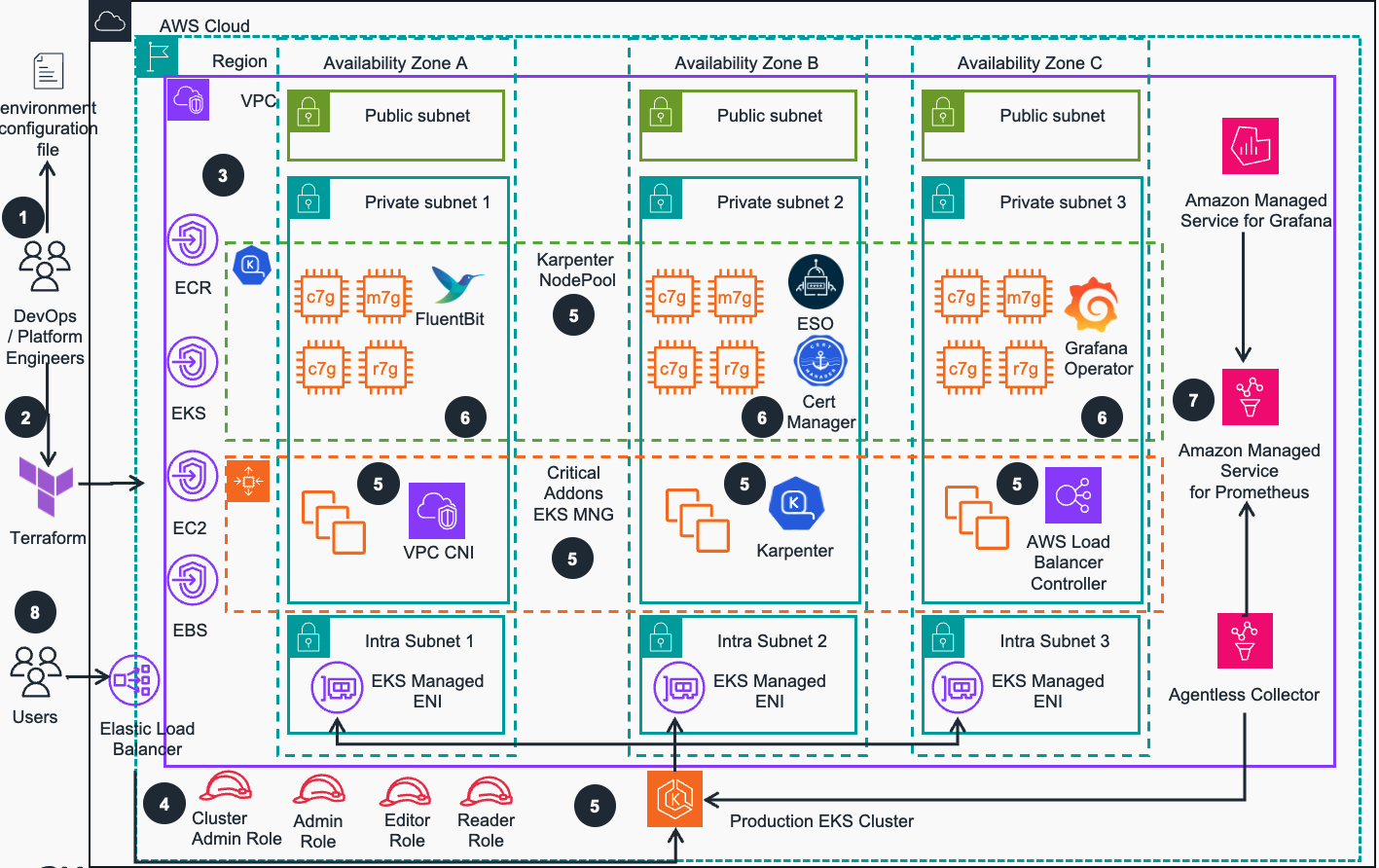
Figure 1: Guidance for Troubleshooting of Amazon EKS using Agentic AI workflow on AWS - Reference Architecture
Reference Architecture Steps
DevOps engineer defines a per-environment Terraform variable file that controls all environment-specific configuration. This configuration file is used in all steps of deployment process by all IaC configurations to provision EKS environments
DevOps engineer applies the environment configuration using Terraform following the deployment process defined in the guidance.
An Amazon Virtual Private Network (VPC) is provisioned and configured based on specified configuration. According to best practices for Reliability, 3 Availability zones (AZs) are configured with corresponding VPC Endpoints to provide access to resources deployed in private VPC.
User facing Identity and Access Management (IAM) roles (Cluster Admin, Admin, Editor etc.) are created for various access levels to EKS cluster resources, as recommended in Kubernetes security best practices
Amazon Elastic Kubernetes Service (EKS) cluster is provisioned with Managed Nodes Groups that run critical cluster add-ons (CoreDNS, AWS Load Balancer Controller and Karpenter auto-scaler) on its compute node instances. Karpenter auto-scaler will manage compute capacity for other add-ons, as well as applications that will be deployed by user
Other important EKS add-ons (Cert Manager, FluentBit, Grafana Operator etc.) are deployed based on the configurations defined in the environment Terraform configuration file (Step1 above).
AWS Managed Observability stack is deployed (), including Amazon Managed Service for Prometheus (AMP), AWS Managed collector for Amazon EKS, and Amazon Managed Service for Grafana (AMG)
Users can access Amazon EKS cluster(s) with best practice add-ons, optionally configured Observability stack and RBAC based security mapped to IAM roles for workload deployments using Kubernetes API that is exposed via AWS Network Load Balancer
Agentic AI workflow Reference Architecture
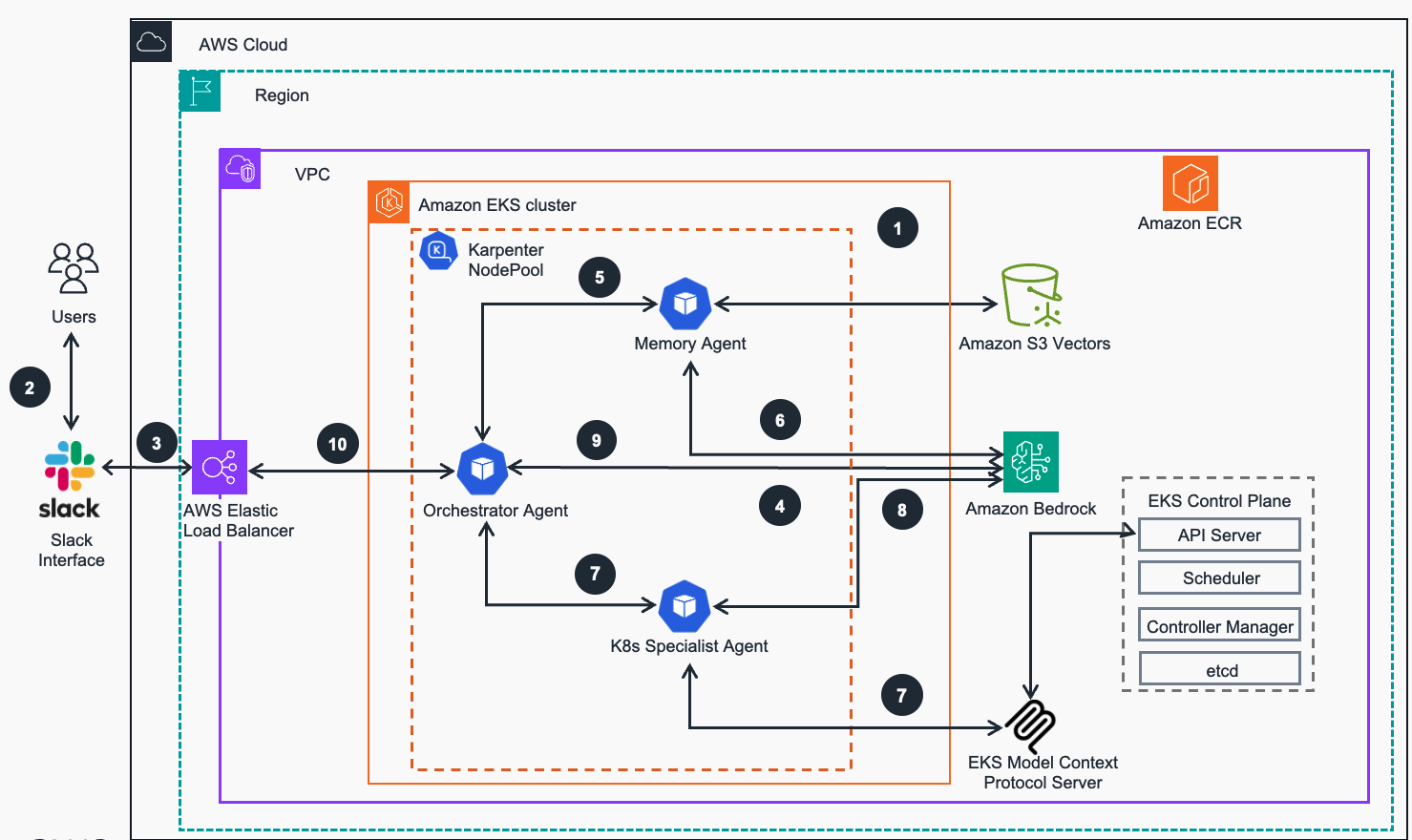
Figure 2: Guidance for Troubleshooting of Amazon EKS using Agentic AI workflow on AWS - Troubleshooting Workflow
Agentic AI workflow Architecture Steps
Foundation Setup - Guidance workloads are deployed into an Amazon EKS cluster, configured for application readiness with compute plane managed by Karpenter auto-scaler.
User Interaction - Users (DevOps engineers, SREs, developers) who encounter Kubernetes (K8s) issues send troubleshooting requests through designated Slack channel integrated with K8s Troubleshooting AI Agent. Its components are running as containers on the EKS deployed from previously built images hosted in Elastic Container registry (ECR) via Helm charts that reference the services-built images
Message Reception & Slack Integration - Slack receives user messages via AWS Elastic Load Balancer and establishes a WebSocket connection (Socket Mode) to the Orchestrator agent running in the EKS cluster.
Intelligent Message Classification & Orchestration - Orchestrator agent receives users’ message and calls Nova Micro model via Amazon Bedrock to determine whether the message requires K8s troubleshooting. If an issue is classified as K8s-related, the Orchestrator agent initiates a workflow by delegating tasks to specialized agents while maintaining overall session context.
Historical Knowledge Retrieval - Orchestrator agent invokes the Memory agent, which connects to Amazon S3 Vectors based knowledge base to search for similar troubleshooting cases for precise classification
Semantic Vector Matching - The Memory agent invokes Titan Embeddings model via Amazon Bedrock to generate semantic embeddings and perform vector similarity matching against the shared S3 Vectors knowledge base
Real-Time Cluster Intelligence - Orchestrator agent invokes the K8s Specialist agent, which utilizes the integrated EKS Model Context Protocol (MCP) Server to execute commands against the EKS API Server. The MCP Server gathers real-time cluster state, pod logs, events, and resource metrics to better “understand” the current problem context.
Intelligent Issue Analysis - K8s Specialist agent sends the collected cluster data to Anthropic Claude model via Amazon Bedrock for intelligent issue analysis and resolution generation.
Comprehensive Solution Synthesis - Orchestrator agent synthesizes the historical context received from Memory agent and current cluster state from K8s Specialist, then uses Claude model via Amazon Bedrock to generate comprehensive troubleshooting recommendations, which are stored in S3 Vectors for future reference.
ChatOps Integration - Orchestrator agent generates troubleshooting recommendations and sends them back to the Users via integrated Slack channel. This illustrates an increasingly popular “ChatOps” Platform Engineering pattern.
AWS Services in this Guidance
| AWS Service | Role | Description |
|---|---|---|
| Amazon Elastic Kubernetes Service ( EKS) | Core service | Manages the Kubernetes control plane and compute nodes for container orchestration. |
| Amazon Elastic Compute Cloud (EC2) | Core service | Provides the compute instances for EKS compute nodes and runs containerized applications. |
| Amazon Virtual Private Cloud (VPC) | Core Service | Creates an isolated network environment with public and private subnets across multiple Availability Zones. |
| Amazon Simple Storage Service (S3) | Core Service | Stores vector embeddings for the knowledge base, enabling semantic search of historical troubleshooting cases. |
| AWS Bedrock | Core Service | Provides the foundational AI models (Claude for analysis, Titan Embeddings for semantic search) for natural language processing and intelligent troubleshooting recommendations. |
| Amazon Elastic Container Registry (ECR) | Supporting service | Stores and manages Docker container images for the agentic troubleshooting agent. |
| Elastic Load Balancing (NLB) | Supporting service | Distributes incoming traffic across multiple targets in the EKS cluster. |
| Amazon Elastic Block Store (EBS) | Supporting service | Provides persistent block storage volumes for EC2 instances in the EKS cluster. |
| AWS Identity and Access Management (IAM) | Supporting service | Manages security permissions and access controls for the agentic agent, ensuring secure interaction with EKS clusters, Bedrock, and S3 Vectors. |
| AWS Key Management Service (KMS) | Security service | Manages encryption keys for securing data in EKS and other AWS services. |
Plan your deployment
This section covers all deployment planning topics including costs, system requirements, deployment prerequisites, service quotas, and regional considerations for the Guidance for Troubleshooting of Amazon EKS using Agentic AI workflow on AWS.
Cost
You are responsible for the cost of the AWS services used while running this guidance. As of November 2025, the cost for running this guidance with the default settings in the US East (N. Virginia) Region is approximately $233.50 per month for a medium-scale deployment processing 10GB of log data daily.
Note: Costs may vary significantly based on the volume of log data processed, frequency of AI model invocations, and scale of your EKS clusters. Monitor your usage regularly to optimize costs.
We recommend creating a budget through AWS Cost Explorer to help manage costs. Prices are subject to change. For full details, refer to the pricing webpage for each AWS service used in this guidance.
Sample cost table
The following table provides a sample cost breakdown for deploying this guidance with the default parameters in the us-west-2 (Oregon) Region for one month. This estimate is based on the AWS Pricing Calculator output for the agentic deployment. This estimate does not factor heavy Bedrock usage beyond the baseline estimate.
| AWS service | Dimensions | Cost, month [USD] |
|---|---|---|
| Amazon EKS | 1 cluster | $73.00 |
| Amazon VPC | 1 NAT Gateways | $33.75 |
| Amazon EC2 | 3 m5.large instances | $156.16 |
| Amazon EBS | gp3 storage volumes and snapshots | $7.20 |
| Elastic Load Balancer | 1 NLB for workloads | $16.46 |
| Amazon VPC | Public IP addresses | $3.65 |
| AWS Key Management Service (KMS) | Keys and requests | $6.00 |
| AWS Bedrock (Claude + Titan) | 1M input tokens, 100K output tokens | $30.00 |
| Amazon S3 | 10GB storage, 10K requests | $0.59 |
| TOTAL | $288.81/month |
For a more accurate estimate based on your specific configuration and usage patterns, we recommend using the AWS Pricing Calculator.
Supported AWS Regions
This guidance uses AWS Bedrock service, which is not currently available in all AWS Regions. You must launch this solution in an AWS Region where these services are available. For the most current availability of AWS services by Region, refer to the AWS Regional Services List.
Guidance for Troubleshooting of Amazon EKS using Agentic AI workflow on AWS is supported in the following AWS Regions:
| Region Name | Region Name |
|---|---|
| US East (Ohio) | Europe (Ireland) |
| US East (N. Virginia) | Europe (Frankfurt) |
| US West (Oregon) | Asia Pacific (Tokyo) |
| Asia Pacific (Sydney) | Asia Pacific (Singapore) |
Quotas
Service quotas, also referred to as limits, are the maximum number of service resources or operations for your AWS account.
Quotas for AWS services in this Guidance
Make sure you have sufficient quota for each of the services implemented in this solution. For more information, see AWS service quotas.
Key quotas to consider:
- AWS Bedrock: Model invocation quotas (tokens per minute)
- Amazon EKS: Cluster and node group limits
To view the service quotas for all AWS services in the documentation without switching pages, view the information in the Service endpoints and quotas page in the PDF instead.
Security
When you build systems on AWS infrastructure, security responsibilities are shared between you and AWS. This shared responsibility model reduces your operational burden because AWS operates, manages, and controls the components including the host operating system, the virtualization layer, and the physical security of the facilities in which the services operate. For more information about AWS security, visit AWS Cloud Security.
This guidance implements multiple security layers to protect your EKS clusters and troubleshooting data:
IAM Roles and Permissions
The solution uses fine-grained IAM roles with least-privilege access principles. Each component receives only the necessary permissions to perform its specific functions:
- Agent Execution Role: Controlled
kubectlaccess with specific cluster permissions
EKS Pod Identity
EKS Pod Identity is used to securely associate IAM roles with Kubernetes service accounts, ensuring that troubleshooting agents have proper cluster access without exposing long-term credentials.
Data Encryption
All data is encrypted both in transit and at rest:
- Amazon S3: Server-side encryption with AWS managed Keys (SSE-S3)
- Network Communication: TLS 1.2+ for all API communications
VPC Security Groups
The solution deploys within your VPC with properly configured security groups that:
- Restrict inbound access to necessary ports only
- Allow outbound access for required AWS service endpoints
- Enable internal communication between solution components
Slack Integration Security
When Slack integration is enabled, security measures include:
- Token Validation: All Slack webhook requests are validated using signing secrets
- Scoped Bot Permissions: Slack bot permissions are limited to specific channels and actions
- Audit Logging: All Slack interactions are logged for security and compliance review
Deploy the Guidance
This guidance provides an advanced Agentic AI EKS troubleshooting system using AWS Strands Agent framework.
Prerequisites
Before deploying this guidance, ensure you have the following prerequisites in place:
AWS Account Requirements:
- AWS CLI configured with appropriate permissions
- Administrator or sufficient IAM permissions to create resources
- Access to AWS Bedrock (requires model access approval for Claude models)
Local Development Environment:
- Terraform >= 1.5.0
- Python 3.9 or later
- Docker 27.0.x or later
- Helm 3.x
- kubectl 1.30.x (recommended for K8s API calls)
Slack Integration (Required):
- Access to Slack workspace with
adminpermissions - Slack webhook URL for basic notifications
- Slack bot application with specific scopes and tokens
Slack Configuration (Required)
Deployment requires Slack integration for alerting and interaction ChatOps capabilities.
Basic Slack webhook Setup
- Create Slack webhook:
- Navigate to your Slack workspace settings
- Go to “Apps” → “Custom Integrations” → “Incoming Webhooks”
- Click “Add to Slack” and select your target channel (e.g.,
#alert-manager-alerts) - Copy the webhook URL (format:
https://hooks.slack.com/services/XXXXXXX/X000000/XXXXXXXXXXXXXXXXXXXXXXXX) - Note the channel name for configuration
Advanced Slack Bot Setup
You need a full Slack application with bot capabilities:
Create Slack Application:
- Visit https://api.slack.com/apps
- Click “Create New App” → “From scratch”
- Enter app name (e.g., “EKS Troubleshooting Bot”) and select your Slack workspace
Configure Bot Token Scopes: Navigate to “OAuth & Permissions” and add these required scopes:
app_mentions:read     - View messages mentioning the bot
channels:history      - View messages in public channels
channels:read         - View basic channel information
chat:write           - Send messages as the bot
groups:history       - View messages in private channels
groups:read          - View basic private channel information
im:history           - View direct messages
im:read              - View basic DM information
Enable Socket Mode:
- Navigate to “Socket Mode” and enable it
- Create an App Token with
connections:writescope - Copy the App Token (starts with
xapp-)
Enable Event Subscriptions:
- Go to “Event Subscriptions” and enable events
- Add these required bot events:
app_mention- Bot mentionsmessage.channels- Channel messagesmessage.groups- Private channel messagesmessage.im- Direct messages
Install Application:
- Go to “Install App” and install to your workspace
- Copy the Bot User OAuth Token (starts with
xoxb-) - Copy the Signing Secret from “Basic Information”
Required Tokens for Agentic AI Deployment:
- Bot Token:
xoxb-...(for bot API calls) - App Token:
xapp-...(for Socket Mode connections) - Signing Secret: Used for request verification
- Webhook URL: Same as basic setup
- Bot Token:
Please see sample settings for Slack application OAuth and Scope permissions below:
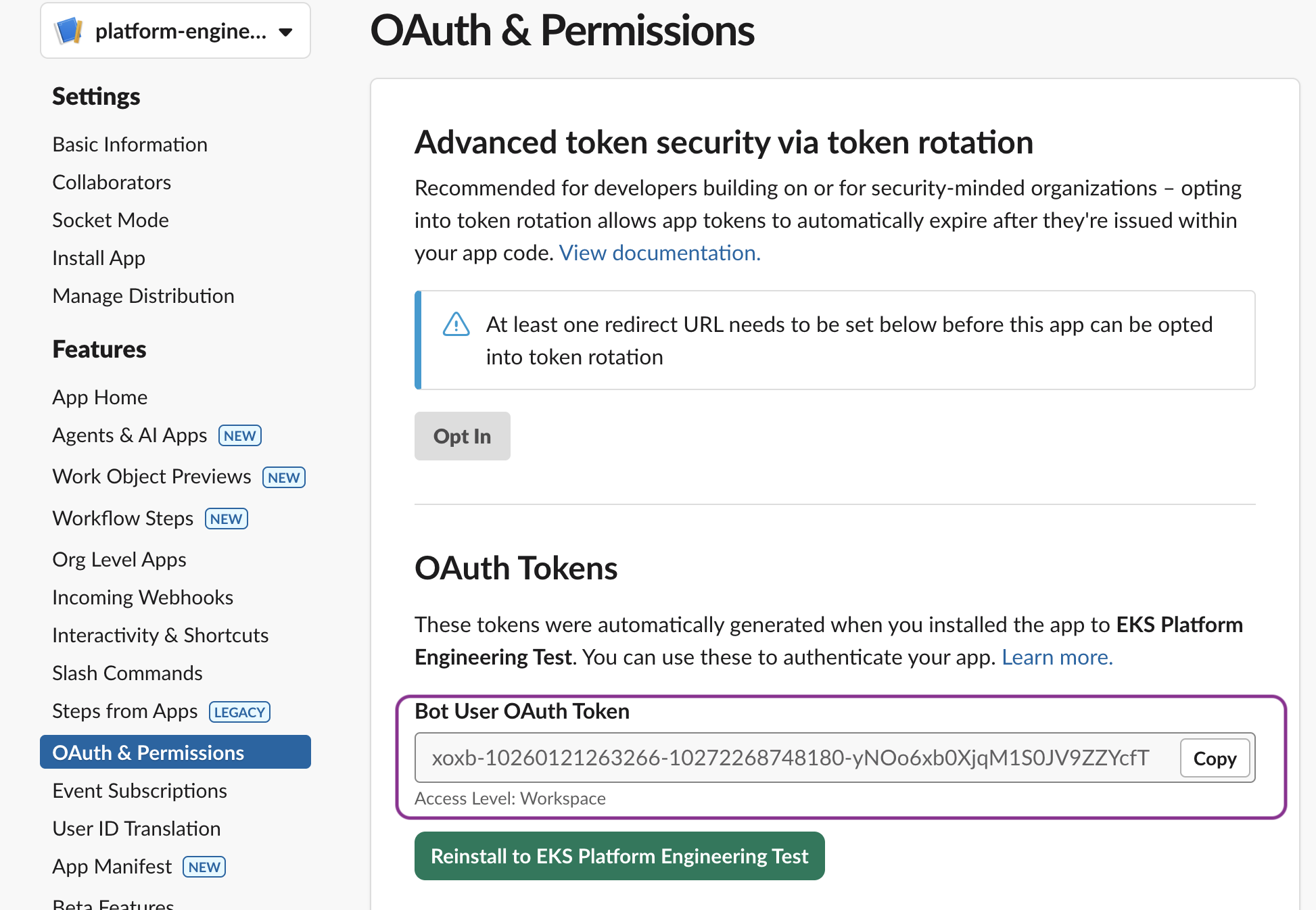
Figure 3: Guidance for Troubleshooting of Amazon EKS using Agentic AI workflow on AWS - Sample Slack app OAuth permissons
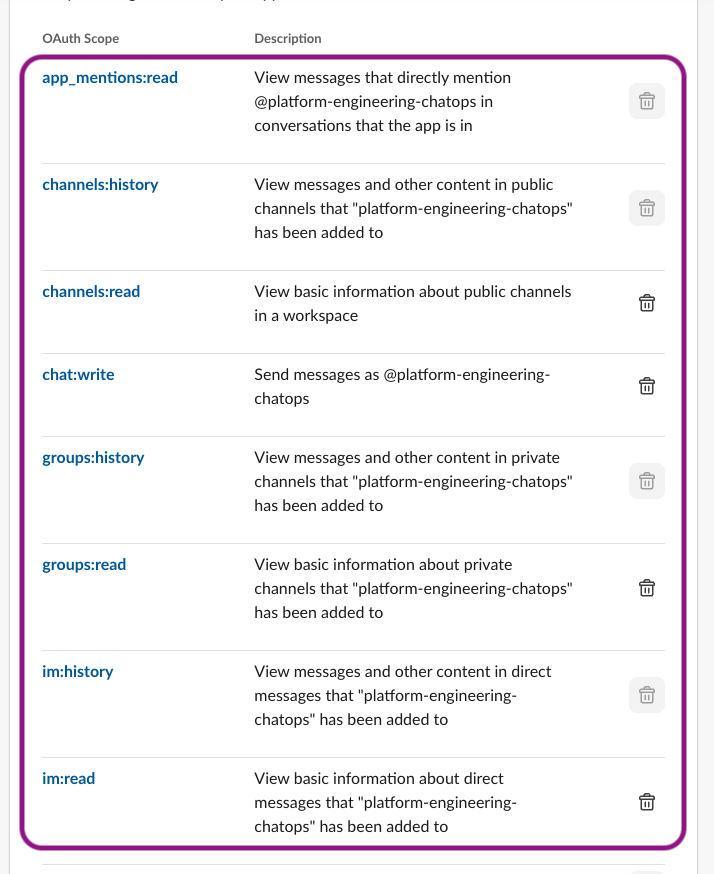
Figure 4: Guidance for Troubleshooting of Amazon EKS using Agentic AI workflow on AWS - Sample Slack app OAuth Scopes
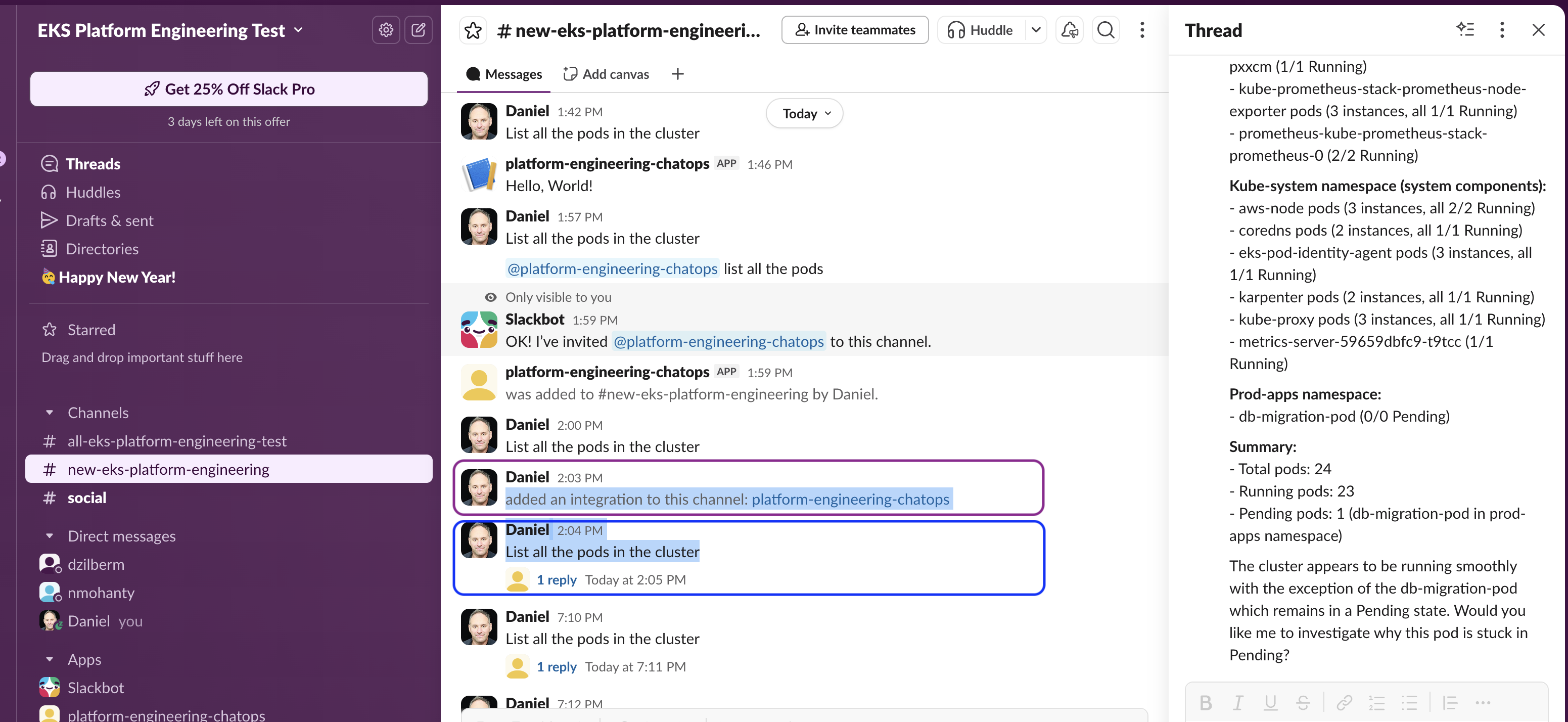
Figure 5: Guidance for Troubleshooting of Amazon EKS using Agentic AI workflow on AWS - Adding Slack Sample app to Channel
Deployment Process Overview
Before you launch the Guidance, review the cost, architecture, security, and other considerations discussed in this guide. This solution offers two deployment approaches with different capabilities and complexity levels.
Time to deploy: Approximately 40-45 minutes
Step 1: Clone and configure the Code repository
- Clone the EKS Agentic AI troubleshooting repository from GitHub:
git clone https://github.com/aws-solutions-library-samples/eks-troubleshooting-agentic-ai-chatops.git
cd eks-troubleshooting-agentic-ai-chatops
- Ensure you have completed the Slack Configuration steps above and have your webhook URL and tokens ready.
Step 2: Solution deployment
Deployment configuration provides advanced AI agent capabilities with kubectl CLI integration and more sophisticated troubleshooting workflows.
Configure agentic deployment
- Set your AWS region environment variable:
export AWS_REGION="us-east-1"
- Create an ECR repository for the agentic agent container images:
aws ecr create-repository --repository-name eks-llm-troubleshooting-agentic-agent
- Create S3 vector storage for the knowledge base:
export VECTOR_BUCKET="eks-llm-troubleshooting-vector-storage-$(date +%s)"
aws s3vectors create-vector-bucket --vector-bucket-name $VECTOR_BUCKET
aws s3vectors create-index --vector-bucket-name $VECTOR_BUCKET --index-name eks-troubleshooting
- Ensure you have completed the Advanced Slack Bot Setup with all required tokens.
Build and push Agentic AI container
- Navigate to the agentic application directory:
cd apps/agentic-troubleshooting/
- Get your ECR repository URL and login:
export ECR_REPO_URL=$(aws sts get-caller-identity --query Account --output text).dkr.ecr.$AWS_REGION.amazonaws.com/eks-llm-troubleshooting-agentic-agent
aws ecr get-login-password --region $AWS_REGION | docker login --username AWS --password-stdin $ECR_REPO_URL
- Build and push the Docker image:
docker build --platform linux/amd64 -t $ECR_REPO_URL .
docker push $ECR_REPO_URL
Deploy agentic infrastructure
- (optional) Create the agentic Terraform configuration file :
cd ../../terraform/
cat > terraform.tfvars << EOF
deployment_type = "agentic"
slack_webhook_url = "https://hooks.slack.com/services/YOUR/SLACK/WEBHOOK"
slack_channel_name = "alert-manager-alerts"
slack_bot_token = "xoxb-your-bot-user-oauth-token"
slack_app_token = "xapp-your-app-token"
slack_signing_secret = "your-signing-secret"
agentic_image_repository = "$ECR_REPO_URL"
vector_bucket_name = "$VECTOR_BUCKET"
EOF
- Deploy the guidance infrastructure from the
terraformdirectory:
./install.sh
If terraform.tfvars file was not created as shown above, the script will prompt you for input for the required parameters.
Test Agentic deployment
- Deploy pods that introduce errors for troubleshooting:
cd ../
./provision-delete-error-pods.sh -p db-migration
- Verify all pods are running in the default namespace:
kubectl get pods -n default
- Test the Slack bot by mentioning it in your configured Slack channel with a troubleshooting query.
Step 3: Validate the deployment
- Verify all pods are running:
kubectl get pods -n agentic-chatbot
Test the chatbot functionality:
- Ask diagnostic questions like “What pods are failing in the default namespace?”
- Test
kubectlintegration by asking “Show me the logs for the failing pod”
Test Slack integration:
- Send a message to your configured Slack channel
- Use the Slack bot to interact with your cluster
Multi-Tier Application Troubleshooting Demo
Demo Overview
This demo showcases the EKS MCP agent troubleshooting a realistic 3-tier application with multiple issues:
Architecture:
- Frontend: Nginx serving React app
- Backend: Node.js API with Redis connection
- Database: Redis cache
- Monitoring: Fake monitoring agent
Pre-Demo Setup
Deploy the Broken Application:
kubectl apply -f demo/multi-tier-app.yaml
Verify Issues Are Present:
kubectl get pods -n demo-app
# Should show: ImagePullBackOff, CrashLoopBackOff, etc.
Demo Flow - Agent Troubleshooting
1. Initial Assessment
User: "Check the status of pods in the demo-app namespace"

Expected Agent Actions:
- Uses list_k8s_resources to show pod statuses
- Identifies multiple failing pods
- Provides overview of issues found
2. Fix ImagePullBackOff Issue
User: "The monitoring-agent pod is failing, what's wrong?"

Expected Agent Actions:
- Uses get_k8s_events to see ImagePullBackOff error
- Identifies nonexistent image: nonexistent/monitoring:latest
- Uses manage_k8s_resource to update deployment with busybox:latest
- Verifies pod is now running
3. Troubleshoot Backend Crashes
User: "The backend-api pods keep crashing, investigate the issue"

Expected Agent Actions:
- Uses get_pod_logs to see Redis connection errors
- Identifies wrong service name: redis-wrong-service
- Uses manage_k8s_resource to fix deployment (redis-wrong-service → redis-service)
- Shows pods are now running but may still have memory issues
4. Resolve Memory Issues
User: "The backend is getting OOMKilled, fix the memory limits"

Expected Agent Actions:
- Uses get_cloudwatch_metrics to show memory usage
- Identifies insufficient memory limits (32Mi request, 64Mi limit)
- Uses manage_k8s_resource to increase memory (128Mi request, 256Mi limit)
- Confirms pods are stable
5. Fix Service Connectivity
User: "Test the frontend to backend connection"

Expected Agent Actions:
- Uses get_pod_logs from frontend to see proxy errors
- Identifies wrong port in nginx config (8080 instead of 3000)
- Uses manage_k8s_resource to update nginx-config ConfigMap
- Restarts frontend pods to pick up new config
6. End-to-End Validation
User: "Verify the entire application is working"

Expected Agent Actions:
- Uses list_k8s_resources to show all pods running
- Uses get_pod_logs to verify healthy API responses
- Confirms frontend can reach backend successfully
- Shows application is fully functional
Issues Fixed by Agent
| Issue | Component | Problem | Agent Solution |
|---|---|---|---|
| ImagePullBackOff | monitoring-agent | nonexistent/monitoring:latest | Update to busybox:latest |
| CrashLoopBackOff | backend-api | Wrong Redis service name | Fix service name in deployment |
| OOMKilled | backend-api | Insufficient memory (32Mi/64Mi) | Increase to 128Mi/256Mi |
| Connection Error | frontend | Wrong backend port (8080) | Fix nginx config to use port 3000 |
EKS MCP Tools Demonstrated
- list_k8s_resources - Monitor pod status across namespace
- get_k8s_events - Investigate cluster events and errors
- get_pod_logs - Debug application issues and crashes
- manage_k8s_resource - Fix deployments, services, and configs
- get_cloudwatch_metrics - Monitor resource usage and performance
Expected Demo Outcome
- Before: 4 broken components with various failure modes
- After: Fully functional 3-tier application
- Demonstrates: Real-world troubleshooting skills and EKS MCP capabilities
- Time: ~10-15 minutes of interactive troubleshooting
Quick Commands
Deploy: kubectl apply -f demo/multi-tier-app.yaml Check: kubectl get pods -n demo-app -w Cleanup: kubectl delete namespace demo-app
Common Troubleshooting
If you encounter issues during deployment or operation, refer to the following common issues and solutions.
Lambda Deployment Issues
Issue: Lambda CreateFunction fails with “image manifest not supported”
This occurs when Docker BuildKit creates OCI-format image manifests that AWS Lambda doesn’t support.
Solution: Add --provenance=false to the Docker build command:
docker build --platform=linux/amd64 --provenance=false -t <image>:latest .
Karpenter Auto-Scaler & GPU Node Issues
Issue: GPU Pod stuck in Pending state
Diagnosis:
kubectl describe pod <pod-name> -n deepseek
kubectl get nodeclaims -A
kubectl describe nodeclaim <nodeclaim-name>
Common Solutions:
EC2 Spot Service-Linked Role Missing
Error in NodeClaim:
AuthFailure.ServiceLinkedRoleCreationNotPermitted: The provided credentials do not
have permission to create the service-linked role for EC2 Spot Instances.
Why This Happens:
AWS requires a service-linked role (
AWSServiceRoleForEC2Spot) for Spot instance management. This role:- Grants EC2 Spot permission to launch, terminate, and manage Spot instances on your behalf
- Is not pre-created in new AWS accounts (security principle of least privilege)
- Must be created once before any Spot instances can be launched
When Karpenter tries to provision Spot instances for the first time, it fails because:
- The service-linked role doesn’t exist yet
- Karpenter’s IAM role typically lacks
iam:CreateServiceLinkedRolepermission
Solution:
Create the role once (requires IAM admin permissions):
aws iam create-service-linked-role --aws-service-name spot.amazonaws.comThen delete the failed nodeclaim to trigger retry:
kubectl delete nodeclaim <nodeclaim-name>Note: This is a one-time setup per AWS account. Once created, all future Spot requests will work without this step.
No Matching Node Affinity: Verify the Karpenter NodePool configuration matches the pod’s node selector:
kubectl get nodepool -A -o yaml
K8s Troubleshooting Agent Issues
Issue: Agent Pod stuck in CrashLoopBackOff
Diagnosis:
kubectl describe pod -l app.kubernetes.io/name=k8s-troubleshooting-agent
kubectl logs -l app.kubernetes.io/name=k8s-troubleshooting-agent --tail=50
Common Solutions:
- Missing IAM Role or Pod Identity Association:
aws eks list-pod-identity-associations \ --cluster-name eks-llm-troubleshooting \ --region us-east-1 - Insufficient IAM Permissions: Verify the agent role has required permissions:
aws iam list-attached-role-policies \ --role-name eks-llm-troubleshooting-agentic-agent-role - EKS Access Entry Missing:
aws eks list-access-entries --cluster-name eks-llm-troubleshooting --region us-east-1
Issue: Bedrock model invocation errors
Verify Bedrock model access in AWS Console under Amazon Bedrock > Model access and ensure Claude models are enabled for your account.
ECR Repository Issues
Issue: ECR Repository not empty on destroy
Solutions:
- Add
force_delete = trueto Terraform configuration - Manually delete repository:
aws ecr delete-repository \
  --repository-name <repo-name> \
  --region us-east-1 \
  --force
Quick Reference - Helpful Commands
# Check all pod status
kubectl get pods -A

# Check node status (including GPU nodes)
kubectl get nodes -o wide

# Check Karpenter nodeclaims
kubectl get nodeclaims -A

# Configure kubectl for the cluster
aws eks --region us-east-1 update-kubeconfig --name eks-llm-troubleshooting

# Get recent cluster events
kubectl get events -A --sort-by='.lastTimestamp' | tail -20

# Check agent logs
kubectl logs deployment/k8s-troubleshooting-agent --tail=50 -f

# Restart agent
kubectl rollout restart deployment/k8s-troubleshooting-agent
Uninstall the Guidance
You can uninstall the Guidance for Troubleshooting of Amazon EKS using Agentic AI workflow on AWS using Terraform. You must manually delete certain AWS resources that contain data, as AWS Guidance implementations do not automatically delete these resources to prevent accidental data loss.
Uninstalling the solution
- Remove any test pods and port forwarding:
# Stop port forwarding (Ctrl+C if running)
# Remove test error pods
kubectl delete deployment db-migration --ignore-not-found=true
- Navigate to the terraform directory and destroy the infrastructure:
cd terraform/
terraform destroy -auto-approve
- Clean up additional resources related to Agentic AI workflow:
# Remove the ECR repository
aws ecr delete-repository --repository-name eks-llm-troubleshooting-agentic-agent --force

# Remove S3 vector storage (replace with your bucket name)
aws s3vectors delete-index --vector-bucket-name $VECTOR_BUCKET --index-name eks-troubleshooting
aws s3vectors delete-vector-bucket --vector-bucket-name $VECTOR_BUCKET
- Manually review and delete any remaining resources:
- S3 buckets created for log storage or vector embeddings
- CloudWatch log groups if you want to remove historical logs
- Any custom IAM roles or policies you may have created
Related resources
The Guidance for Multi-Region Application Architecture is complementary to this solution, providing architectural patterns for deploying EKS clusters across multiple regions for enhanced reliability.
The Amazon EKS Best Practices Guide provides comprehensive guidance for operating and securing EKS clusters in production environments.
The AWS Observability Best Practices guide offers additional monitoring and troubleshooting strategies for containerized workloads.
Contributors
- Daniel Zilberman, Sr Solutions Architect, AWS Prototyping and Scaling
- Aashish Krishamurthy, Associate Delivery Consultant , AWS proserve
- Natasha Mohanty, Associate Solutions Architect, AWS Technical Solutions
- Lucas Duarte, Principal Solutions Architect, Agentic AI technologies
Notices
Customers are responsible for making their own independent assessment of the information in this document. This document: (a) is for informational purposes only, (b) represents AWS current product offerings and practices, which are subject to change without notice, and (c) does not create any commitments or assurances from AWS and its affiliates, suppliers or licensors. AWS products or services are provided “as is” without warranties, representations, or conditions of any kind, whether express or implied. AWS responsibilities and liabilities to its customers are controlled by AWS agreements, and this document is not part of, nor does it modify, any agreement between AWS and its customers.